FixYourVPN

ESPN+ is only available in the United States, so watching from the UK or anywhere else abroad means using a VPN connected to a US server. ESPN+ is stricter than most streaming services because it checks your DNS requests as well as your IP address, which is why some VPNs that work fine elsewhere struggle here. Start with the first two fixes below, as they deal with the most common causes.
Connect to a US server and enable DNS leak protection
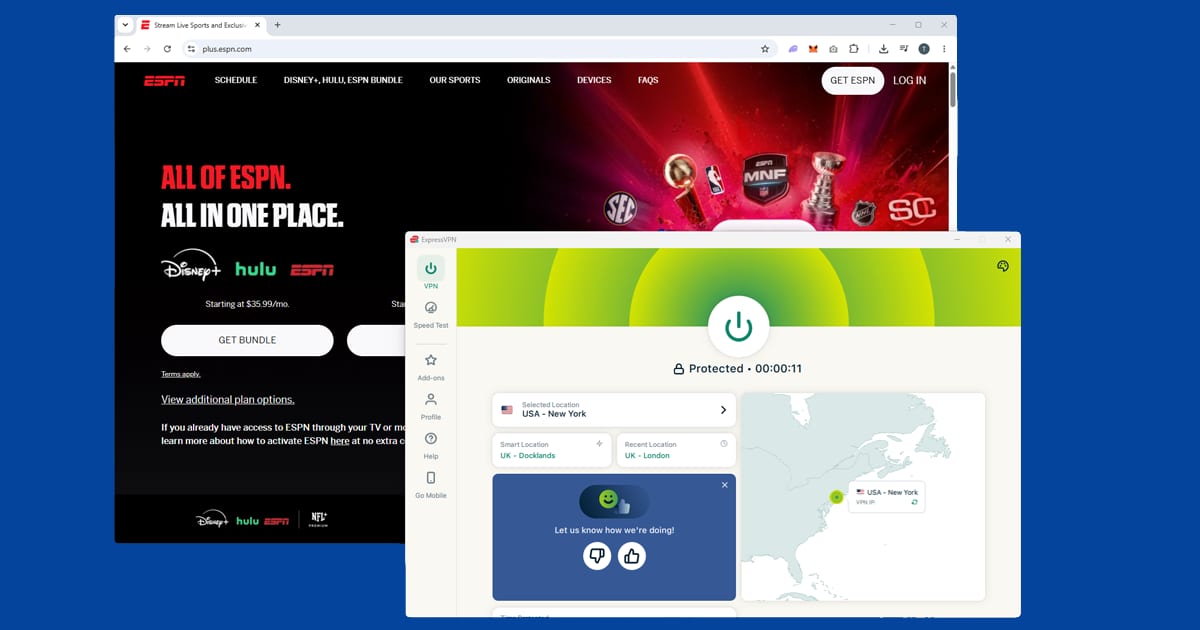
Open your VPN app, connect to a US server, and check that DNS leak protection is switched on before opening ESPN+. ESPN+ verifies your location in two ways: your IP address and your DNS requests.
A VPN that only masks your IP but lets DNS requests go through your regular internet provider will still get blocked. DNS leak protection routes those requests through the VPN too, and ESPN+ can't tell you're outside the US.
In NordVPN, DNS leak protection is in Settings > Connection and is on by default. In ExpressVPN, it's handled automatically when you connect. New York, Chicago, and Los Angeles are the most reliable US cities for ESPN+.
Once connected, use our IP address checker to confirm your VPN is showing a US location before opening ESPN+.
Switch to a different US server if you're still blocked
If ESPN+ shows a location error after connecting, the server you're on has likely been flagged. Switch to a different US server and try again. ESPN+ updates its blocked IP list regularly, so a server that worked last week may not work today.
Try two or three cities before moving on: New York, Chicago, and Los Angeles are the best starting points, and Dallas or Miami are good backups if all three are blocked.
If your VPN has streaming-optimised servers, start with those: they improve your odds, though they aren't guaranteed to work. If one's blocked, try a different server or city in the same country. Our guide to switching VPN servers has the steps for each major app.
Clear cookies and open a private window
If you've been to ESPN+ or the Disney site before without a VPN, your browser has stored cookies that can include your real location. Even with your VPN connected, those old cookies can cause playback to fail.
Connect your VPN first, then open a private window (Incognito in Chrome and Edge, Private Browsing in Firefox and Safari) and go to espnplus.com. Private windows start fresh with no stored data, so ESPN+ can only see your current US connection. The order matters: VPN on, then private window, then ESPN+.
If ESPN+ works in a private window but not your regular browser, clearing cookies fixes it for good:
- Chrome: three-dot menu SettingsPrivacy and securityDelete browsing data, tick Cookies, set range to All time
- Edge: three-dot menu SettingsPrivacy, search, and servicesClear browsing data, tick Cookies, set range to All time
- Firefox: hamburger menu SettingsPrivacy & SecurityClear Data
- Safari (Mac): SafariSettingsPrivacyManage Website Data
- Safari (iPhone/iPad): open the Settings app AppsSafariClear History and Website Data
Try the ESPN app instead of the browser
If the browser isn't working, try the ESPN app. For live events especially, the app tends to be more stable. Make sure you're using the full VPN app on your device, not just a browser extension: extensions only cover traffic inside the browser and won't protect the ESPN app.
The ESPN app may not appear in your regional App Store or Play Store outside the US. If it's missing, you'll need to switch your store region to the US to download it. On iOS, a US Apple ID is the most reliable way to do this.
ESPN+ on smart TVs and consoles
The ESPN app is available on Apple TV, Roku, Amazon Fire TV, PlayStation 4 and 5, and Xbox. For streaming sticks and Apple TV, install your VPN app, connect to a US server, then launch ESPN. Consoles don't support VPN apps, so the easiest option there is setting up the VPN on your home router: everything connected to it then goes through a US connection automatically.
For smart TVs running Samsung Tizen or LG webOS, use a router VPN or share your laptop's VPN connection as a wi-fi hotspot and connect the TV to that.
Watching UFC from outside the US
UFC is no longer on ESPN+. As of 2026, the UFC moved to Paramount+ under a new deal, and all events including numbered PPV cards are included in a standard Paramount+ subscription with no extra charge. If UFC is what you're after, ESPN+ isn't the right destination anymore.
Paramount+ is also US-only outside a handful of markets, so watching UFC from the UK still requires a VPN connected to a US server. The same principles apply: US server, check your IP, private window.
For live events on any streaming service, turning on your VPN's Kill Switch is worth doing: if the VPN drops and reconnects mid-fight, the service detects the IP change and cuts the stream. The kill switch pauses your internet completely until the VPN reconnects, preventing that.
What's on ESPN+ and what UK viewers already have
The full ESPN+ catalogue covers NFL games, NHL, MLB, La Liga, the Bundesliga, NWSL women's soccer, college football and basketball, and a wide catalogue of combat sports and boxing. UFC moved to Paramount+ in 2026 and is no longer part of ESPN+.
UK viewers with Disney+ already get some ESPN content through the ESPN hub: La Liga Saturday matches, the UEFA Women's Champions League, and NCAA March Madness are all included. In 2026 March Madness was also free on DAZN in the UK. Sky Sports holds the rights to NCAA college football in the UK. If any of those is what you need, you may already have it without a VPN.
The account barrier for new UK subscribers
ESPN+ requires a US payment method to subscribe. If you already have a US ESPN+ account, it works fine from abroad as long as you're connected to a US server. If you're signing up fresh from the UK, you'll need a US credit card, a US PayPal account, or a US iTunes or Google Play account. This is the trickiest part for new subscribers, and it's separate from the VPN setup.
How ESPN+ compares to other regional sports platforms
ESPN+ is far from the only sports streaming service that ties your account to one specific country. DAZN works the same way: your account's registered country has to match the VPN server you're connecting from, or you'll either get the wrong library or be blocked outright. beIN Sports takes it further and runs as several genuinely separate regional platforms (MENA, US, France, Australia) rather than one global service, so matching your account to the right region matters even more there. If you're in the UK, TNT Sports is the more direct route to Champions League and Premier League coverage without needing a US VPN at all. Across all of these, the same pattern holds: live sport gets checked more aggressively and in real time, so a server that works fine for on-demand catch-up can still get flagged the moment a big match kicks off.
Error messages explained
"This content is not available in your location" means ESPN+ has detected a non-US connection. Try a different US server, make sure DNS leak protection is on, and open ESPN+ in a fresh private window.
"You need a subscription to watch this" on content you've paid for usually means your account session has expired. Sign out, sign back in on the US server, and try again.
Video that starts then immediately cuts out is usually a mid-stream location check. This is more common on live events. Switch to a different US server and restart the stream.
ESPN+ is now ESPN Select
If you're looking for "ESPN+" in the ESPN app and can't find it, that's because the plan has a new name. ESPN+ is now called ESPN Select, and it sits alongside a bigger plan called ESPN Unlimited. Select carries the same kind of live events and on-demand programmes ESPN+ always had. Unlimited adds the live ESPN TV channels, including ESPN, ESPN2, ESPNU, SEC Network and ACC Network.
Prices went up on 17 September 2026. ESPN Select is now $13.99 a month or $139.99 a year, and ESPN Unlimited is $31.99 a month. If you were already subscribed, check your ESPN account to see when the new price applies to you.
For VPN users, the good news is that both plans live in the same ESPN app and check your location in the same way, so everything in this guide still applies. If you pay for Unlimited, remember that US sport is often subject to regional blackouts, so if a game won't play on a server in one US city, try a server in another before assuming your VPN has been caught.
If you'd rather watch US sport through a live TV bundle instead, our Fubo guide covers one of the main options. More sports services are in the live sport hub.