FixYourVPN
If your VPN keeps getting blocked or won't connect on certain networks, the protocol is often why. A protocol is simply the method your VPN uses to send your encrypted data. Different methods handle different types of blocks, and switching from one to another takes about 30 seconds in most VPN apps.
What a VPN protocol actually is
A VPN works by creating an encrypted tunnel between your device and a VPN server. The protocol is the connection method: the set of rules that determines how that tunnel gets built and how data travels through it. Think of it like different routes between two cities. Some are faster, some are more reliable in bad weather, and some are better at avoiding roadblocks.
Different protocols behave differently on restricted networks. Some are fast but easier for firewalls to spot and block. Others are slower but much better at getting through. Knowing which to reach for in which situation saves a lot of trial and error.
The main protocols and when to use them
WireGuard is the newest of the main protocols and, for most people in most situations, the best choice. It's faster than the alternatives, uses less battery on mobile, and is just as secure. If your VPN offers it and you're not on a heavily restricted network, use this one. NordVPN offers WireGuard under the name NordLynx. It's also the protocol worth reaching for first if voice or video calls in apps like Discord or Zoom are choppy, since its lower overhead directly translates into less added delay.
OpenVPN is the long-standing standard. It's slightly slower than WireGuard but very well-established and extremely reliable. It comes in two variants, TCP and UDP, which are just two different ways your VPN can send data: UDP doesn't double-check that data arrived correctly, which makes it faster and better for streaming, while TCP does, which makes it slower but more reliable and better at getting through firewalls. If WireGuard isn't available or isn't working, try OpenVPN (UDP) first, then OpenVPN (TCP) if UDP fails.
IKEv2/IPSec is particularly good on mobile because it handles switching between wi-fi and mobile data without dropping the connection. If you're on a phone and your VPN connection keeps dropping when you move between networks, IKEv2 is worth trying.
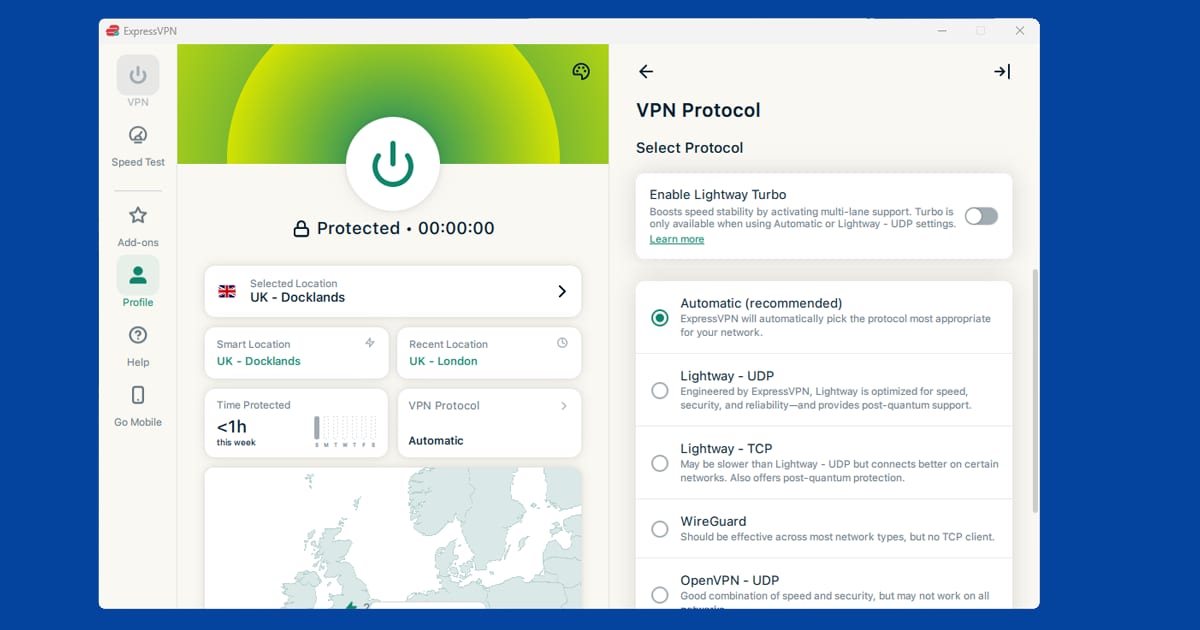
Lightway is ExpressVPN's own protocol, built for the same goals as WireGuard: fast connections, low battery use, and quick reconnections. If you're on ExpressVPN, this is the one to use.
Not sure which protocol to pick? Start with WireGuard. It's the fastest, most reliable option on most networks and works for the vast majority of situations.
How to switch protocol
The protocol setting is usually in your VPN app's settings, one level below the main connection screen:
NordVPN: Settings > Connection > VPN Protocol. Select from Auto, NordLynx (WireGuard), OpenVPN (UDP), OpenVPN (TCP), or IKEv2/IPSec. Auto usually picks NordLynx.
ExpressVPN: The three lines (hamburger) menu > Preferences > Protocol. Options include Automatic, Lightway (UDP), Lightway (TCP), OpenVPN (UDP), OpenVPN (TCP), IKEv2. Automatic typically picks Lightway.
PureVPN: Settings > Protocol. Options include Auto, WireGuard, OpenVPN (UDP), OpenVPN (TCP), IKEv2, L2TP, and SSTP. WireGuard is the recommended starting point; L2TP and SSTP are older and worth leaving alone unless every other option fails to connect.
After changing the protocol, you'll need to disconnect and reconnect for the change to take effect. The same options are available in the mobile apps under the same Settings or Preferences area, though the layout may look slightly different on iOS or Android.
Which protocol to try first for streaming problems
For streaming on a home network, WireGuard (or NordLynx on NordVPN) or Lightway on ExpressVPN is the best starting point. Both add minimal delay and work for the vast majority of streaming situations.
If streaming is working but you're getting buffering, the protocol usually isn't the cause. Buffering with an active VPN is almost always down to the server being too far away or under heavy load. Try a different server in the same country rather than changing protocol.
If you're on a restricted network (hotel, university, work) and the VPN won't connect at all, switch to OpenVPN (TCP) on port 443. Port 443 is the same port used by every HTTPS website, so networks almost never block it. This is the most reliable way to get a VPN through a tight firewall.
When protocol isn't the problem
Protocol changes are most useful when the VPN won't connect on a particular network at all, or when the connection keeps dropping. They're less likely to help if the VPN is connecting fine but streaming services are still detecting you. In that situation, the more likely causes are the server's IP address being flagged (see our guide on switching servers), a DNS leak, or the browser exposing your location. Try switching server first.
Protocol at a glance
If you just want the short version before digging into settings, here's roughly how the main options compare:
- WireGuard (or NordLynx on NordVPN): the fastest and most efficient option for most people. Great for streaming, gaming, and everyday browsing. Not always the best choice on very restrictive networks.
- Lightway: ExpressVPN's own protocol, built with similar goals to WireGuard. Fast, light on battery, and the sensible default if you're on that provider.
- OpenVPN (UDP): a touch slower than WireGuard but extremely well-tested and reliable. A solid fallback if WireGuard isn't behaving.
- OpenVPN (TCP), port 443: the slowest of the bunch, but the one most likely to get through strict firewalls, since it looks like ordinary HTTPS traffic.
- IKEv2/IPSec: handles switching between wi-fi and mobile data particularly well, which makes it a strong choice for a phone that moves between networks a lot.
None of these is objectively "best" in every situation. WireGuard wins on raw speed most of the time, but the right pick genuinely depends on the network you're on and what you're trying to do. If you're chasing better speeds generally rather than just picking a protocol, our guide on why your VPN might be running slow covers the other big factors like server distance and load. And if switching protocol hasn't stopped your VPN from dropping out altogether, our guide to VPNs that keep disconnecting works through the rest of the likely causes.
Obfuscated protocols for heavily restricted networks
Some networks don't just block VPN ports, they actively scan traffic for patterns that look like VPN encryption and block it outright. This is more common in countries with heavy internet censorship, and it occasionally shows up on strict corporate or school networks too.
For these situations, look for an obfuscation or "stealth" setting rather than switching protocol alone. NordVPN calls this Obfuscated Servers, tucked away in the VPN protocol settings alongside the regular options. ExpressVPN builds obfuscation into Lightway automatically, so there's typically nothing extra to switch on. These modes disguise VPN traffic so it looks more like regular encrypted web browsing, which makes it much harder for a firewall to single out and block.
This is a narrower use case than most people need. If your VPN connects fine at home and on public wi-fi, you probably won't ever need to touch this setting. It's worth knowing about if you travel somewhere with tighter internet restrictions, though exactly how well it holds up can vary by country and network, and isn't something we can promise with total certainty in every case.
Does protocol affect battery life on mobile?
Yes, a bit. WireGuard and Lightway are both built to be efficient, which means less processing overhead and less battery drain than older protocols. OpenVPN uses more processing power to do the same job, so it tends to drain a phone's battery faster over a long session. IKEv2 sits somewhere in the middle.
If you're using a VPN all day on your phone and you've noticed your battery draining faster than usual, switching to WireGuard or your provider's equivalent is worth trying before you assume it's a battery health problem. It won't make a night-and-day difference, but it's a genuine factor, especially with the screen off and the VPN holding a constant connection in the background.
Setting protocol on a router
If you've set up your VPN at the router level so it covers every device on your home network, your protocol options are usually more limited than in the app. Most consumer routers that support VPN client setups only handle OpenVPN, and a smaller number now support WireGuard. IKEv2 and proprietary protocols like Lightway typically aren't available at all in a router configuration, since they need the provider's own app to run properly.
If your router only offers OpenVPN and speeds feel slow as a result, that's a known trade-off of router-level VPN setups rather than something you're doing wrong. Running the VPN app directly on individual devices, where WireGuard is usually available, will be noticeably faster if speed matters more to you than covering the whole network at once.
Post-quantum protection and protocols
You may have spotted a new setting in your VPN app with "post-quantum" in the name. It's encryption designed to stand up to quantum computers, which don't exist at a useful scale yet but could one day crack today's encryption. The worry is that someone could record your traffic now and decrypt it later, so VPN companies are adding protection early. It uses a method called ML-KEM, which the US standards body NIST approved as FIPS 203.
NordVPN is a good example. It first added post-quantum encryption to its Linux app in September 2024, then rolled it out across its other apps, including Windows, macOS, iOS, Android, Android TV and Apple TV. It's built into NordLynx, NordVPN's WireGuard-based protocol, but it's switched off by default, and it doesn't currently work with dedicated IPs, obfuscated servers or Meshnet.
That last point matters for this guide. If you're on a strict network where you need obfuscated servers to get through, you can't have post-quantum protection at the same time. So choose based on the problem you're solving:
- Getting past a firewall: use obfuscation and leave post-quantum off for now.
- Everyday privacy on a normal network: switching post-quantum on is a sensible extra.
For streaming it makes no real difference either way. If you're fighting a campus firewall, our guide to VPNs on university networks goes further, and our connection problems hub has more.