FixYourVPN

If you're an Australian living or travelling abroad, 7Plus is probably one of the first things you miss. It's free, it carries Home and Away every weeknight, it has Seven's AFL matches, and there's a good back catalogue of Australian reality TV and drama. The catch is it's geo-blocked outside Australia: open it from another country and you'll hit a location error before you get anywhere near the content. An Australian VPN server fixes that. It gives 7Plus an Australian IP address to check against, and the block doesn't trigger.
What's on 7Plus
7Plus is the streaming service from Seven Network, one of Australia's three major commercial broadcasters. It carries five live channels: Channel 7, 7mate, 7two, 7flix, and 7Bravo, all running on Australian Eastern time. On top of the live channels there's a large catch-up library of everything Seven has aired.
Home and Away is the headline draw for most people watching from abroad. It's been on Seven since 1988 and there's no way to stream the current Australian episodes from outside the country without a VPN. The show does air in the UK on Channel 5, but that version runs well behind the Australian broadcast. If you want to keep up with the current series rather than wait for the UK schedule to catch up, 7Plus is the only option.
Beyond Home and Away, Seven produces My Kitchen Rules, SAS Australia, and Farmer Wants a Wife. Sunrise, the long-running morning news programme, goes out live each weekday and is popular with Australians abroad who want Australian news rather than local coverage.
For sport, Seven holds the free-to-air AFL broadcast rights in Australia, making 7Plus the place to watch AFL matches without paying for Kayo. Seven also holds the rights to Melbourne Cup week and the Spring Racing Carnival, as well as some athletics. If you're after live Australian sport for free, 7Plus covers a fair amount of it.
What you need
A free 7Plus account and a VPN with Australian servers. That's it.
The 7Plus account is free and only needs an email address to create. Sign up at 7plus.com.au with your VPN already connected to an Australian server; registering from a non-Australian IP may block the sign-up page. During registration you'll probably be asked for a postcode. Any Australian one is fine: 2000 for Sydney, 3000 for Melbourne.
For the VPN, NordVPN and ExpressVPN both have solid Australian server coverage and work well with 7Plus. Free VPNs get flagged quickly because their limited IP pools are widely known. Our IP address checker is handy for confirming your VPN is showing an Australian location before you open 7Plus.
Connecting from abroad
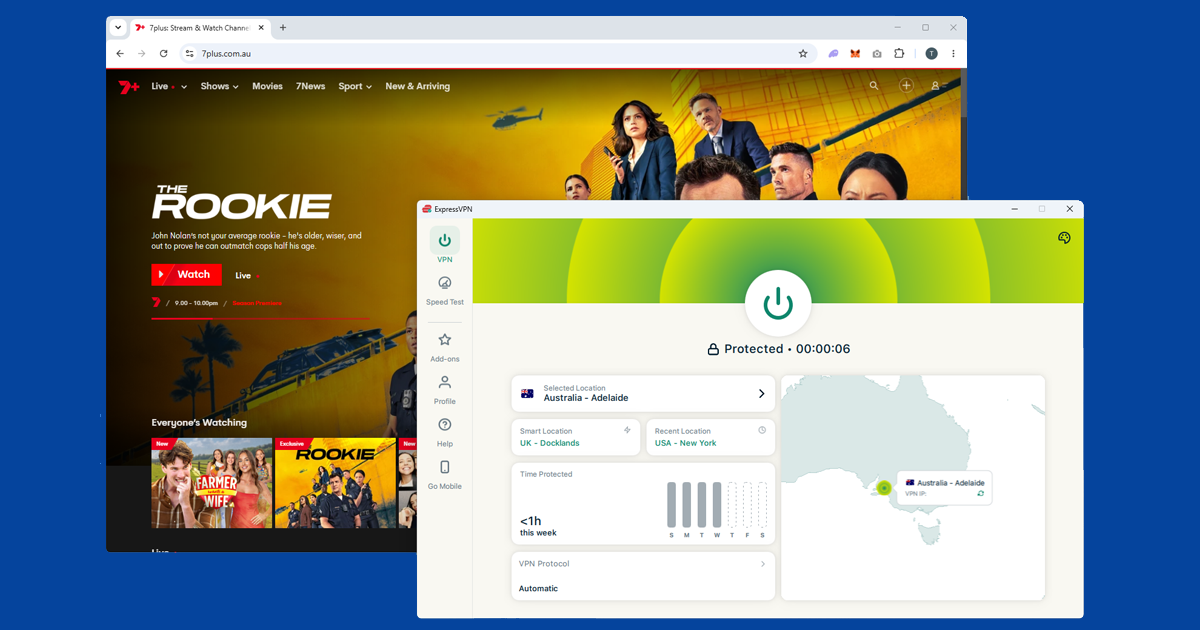
Open your VPN before you open 7Plus, not after. Connect to an Australian server, wait for it to confirm, then load the site. 7Plus runs a location check as soon as the page loads, so the VPN needs to be running first.
Sydney is the best city to start with on most providers; it tends to have the largest server pool. In NordVPN, search for Australia and pick Sydney. In ExpressVPN, select Australia then choose Sydney as the city.
Open 7plus.com.au in a private window rather than a regular tab. Browsers hold onto cookies between sessions, and if you've ever visited 7Plus without a VPN on, there may be a location cookie saved from that visit. A private window starts clean. Sign in, and you should be straight into the content.
Still seeing a location error? Try a different Australian city. Melbourne and Brisbane are good alternatives when Sydney servers have been flagged. Our guide on how to switch VPN servers has the steps for each app.
If it's still not working
Open our IP address checker with the VPN running. If it shows your real country rather than Australia, the VPN isn't routing correctly on that server. Switch to a different Australian city, reconnect, and check again before trying anything else.
If the checker shows an Australian location but 7Plus is still blocking you, the specific server IP has probably been flagged. At that point, try changing your VPN protocol. In NordVPN, go to Protocol in settings and switch to NordLynx (WireGuard). In ExpressVPN, try Lightway. Reconnect after switching. Our VPN protocol guide walks through the steps for each app.
The free Australian streaming services
7Plus sits alongside 9Now, 10Play, and ABC iview as one of the free ad-supported Australian streaming services. None of them overlap much on content: Home and Away and Seven's AFL coverage live on 7Plus; Nine's shows like Married at First Sight, The Block, and NRL coverage are on 9Now; 10Play carries CBS content such as NCIS and Survivor alongside Ten's own programming; and ABC's news, drama, and documentaries are on ABC iview.
All of them require an Australian VPN server from outside the country, and all of them are free to sign up for. If you want the full picture of Australian TV, registering for more than one is worth the few minutes it takes, since your VPN is already doing the hard work.
What the location error actually says
Most of the time it's a fairly blunt message telling you the content isn't available in your region, sometimes with a note pointing you towards using 7Plus while in Australia. Occasionally you'll get a generic playback error instead of a clear location message, particularly on live channel streams, which can look like a technical glitch rather than a geo-block. Treat it the same way either time: reconnect your VPN properly, open a fresh private window, and reload before you try anything more involved.
Keeping the stream steady
On-demand catch-up content on 7Plus is fairly light on your connection, but the live channels and live AFL coverage ask more of it. If you're getting buffering or dropouts:
- Switch to a faster protocol. WireGuard (NordLynx in NordVPN) and Lightway in ExpressVPN both handle live streaming better than older protocols like OpenVPN.
- Stick with Sydney or try Brisbane. Sydney has the biggest server pool on most providers, but if you're further east or in Asia, Brisbane can sometimes give a shorter, steadier route.
- Use a wired connection for live sport. wi-fi jitter is more noticeable during a live AFL match than while watching a catch-up episode of Home and Away, so plugging in directly helps if buffering keeps interrupting the game.
Do free VPNs work for 7Plus?
Occasionally, but not reliably enough to depend on. 7Plus isn't as strict as a paid service like Kayo or Binge, so a free VPN might sneak through for a session or two. The trouble is free VPNs typically share a small pool of server addresses across a huge number of users, and those addresses get flagged and blocked quickly once enough people are using them for the same thing. You're also likely to run into speed caps that make live sport painful to watch. A budget-friendly paid VPN is a much steadier option if 7Plus is something you'll want access to regularly.
On TVs and other devices
7Plus has apps for iOS, Android, Apple TV, Samsung Smart TV, and LG Smart TV. Getting the VPN working alongside it depends slightly on what you're watching on.
On a phone or tablet, install the VPN app, connect to an Australian server, then open 7Plus. Make sure it's the full VPN app installed on the device and not just a browser extension; extensions only protect browser traffic and won't cover the 7Plus app.
If 7Plus doesn't appear when you search for it in the App Store or Google Play, your store is showing the catalogue for your current country rather than Australia. The simplest workaround is to open 7plus.com.au in your phone's browser instead: it works just as well as the app for most content and doesn't need any store region changes. Alternatively, you can switch your App Store or Google Play account region to Australia, though this affects all app availability and purchases on that account.
Apple TV has native VPN apps for both NordVPN and ExpressVPN. Connect to an Australian server in the VPN app, then open 7Plus.
Samsung and LG smart TVs both have native 7Plus apps but don't support VPN apps directly. Setting up the VPN on your home router is the most practical solution: every device on your network picks up the Australian IP automatically after that, including the TV. Chromecast works the same way; cast from a phone or laptop that already has the VPN running.