FixYourVPN

VPN and Roblox don't always get on, and the reason matters as much as the fix. A school block, a slow connection, a country restriction: each one looks the same on the surface but needs a different solution. Here's how to tell them apart.
1. Your school or work wi-fi is blocking Roblox
School and office networks block gaming sites. They update those lists too, so even if Roblox worked last week it might not today. A VPN encrypts your traffic before it reaches the filter, so the filter just sees an encrypted stream heading somewhere and lets it through.
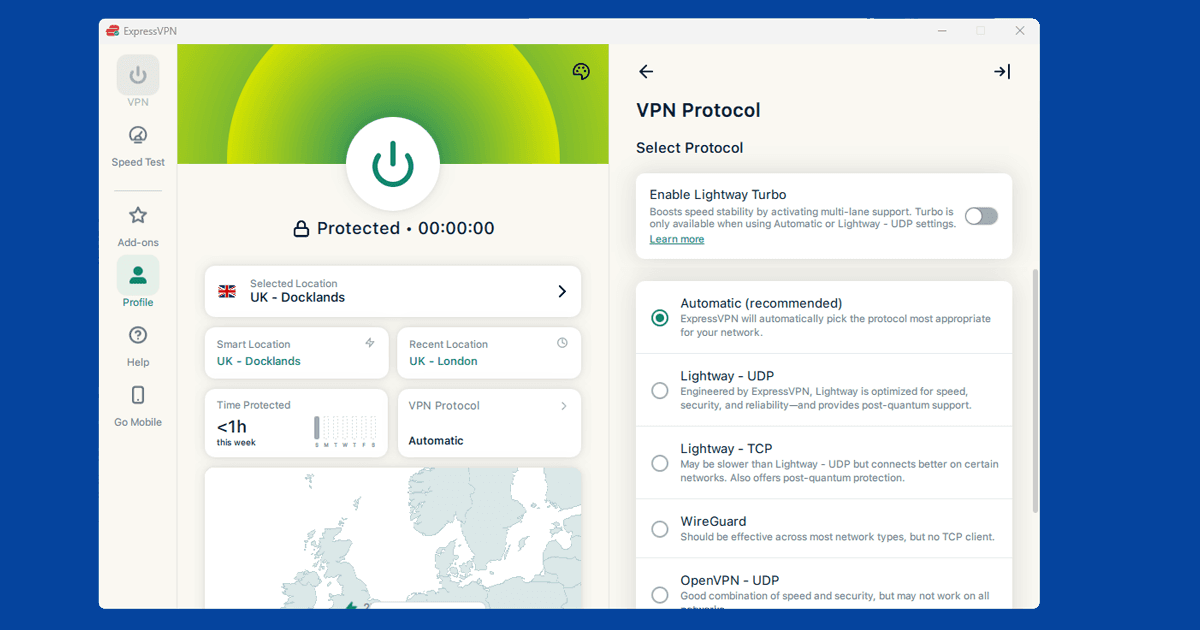
Connect to any VPN server, then try Roblox. If it still won't load, your network is filtering VPN traffic on top of blocking Roblox. Some schools and universities do this. The fix is to switch to a protocol that looks like ordinary web browsing rather than VPN traffic:
- NordVPN: Settings > VPN Protocol > try NordLynx first, then OpenVPN (TCP) if that doesn't work
- ExpressVPN: Settings > Protocol > try Lightway, or OpenVPN (TCP) if Lightway is also blocked
OpenVPN TCP on port 443 is the one most likely to slip through a strict network filter, because port 443 is the same port all normal HTTPS websites use. Blocking it would break ordinary web browsing for everyone, so most network admins leave it alone. Our protocol guide walks through the steps for every major VPN app.
If you're at university specifically, our university wi-fi guide has more on campus-specific blocks.
2. Roblox keeps throwing connection errors with the VPN on
If Roblox refuses to connect when your VPN is running but works fine without it, the VPN server's IP has been flagged. Roblox identifies IP ranges belonging to VPN providers and blocks them. It's the same approach streaming services take. Switch the server, not the VPN.
Switch to a different server in the same country and try again. In NordVPN you can expand any country in the server list to see individual servers. In ExpressVPN, browse the full list and pick a different location. It usually only takes one or two switches to find one that works. Our server-switching guide has the steps for each app.
If you're on a free VPN and this keeps happening, that's a structural problem rather than bad luck. Free VPNs share the same small set of IP addresses between all their users, so those IPs get flagged much faster. A paid provider with a large, regularly-refreshed server pool will have this problem far less often.
3. Roblox loads but the lag makes it unplayable
A VPN adds a routing hop between you and Roblox's game servers. If that hop goes through a server on the other side of the world, the round trip takes longer and you feel it as lag. It's a setup problem, not a VPN fault.
Start by connecting to a VPN server that's close to where you actually are. If you're in the UK, a UK or European server adds very little extra delay. Routing to a US server from the UK and back adds two long-distance hops and is where most of the lag comes from.
Then switch to WireGuard protocol if you haven't already. WireGuard has much lower processing overhead than OpenVPN and makes a real difference to ping in games:
- NordVPN: Settings > VPN Protocol > NordLynx
- ExpressVPN: Settings > Protocol > Lightway (UDP)
If you're running the VPN for general privacy rather than to bypass a block, split tunneling is worth setting up. It lets Roblox connect directly at full speed while everything else stays on the VPN:
- NordVPN (Windows/Android): Settings > Split Tunneling > add Roblox to the excluded apps list
- ExpressVPN: Options > General > Split tunneling > "Do not allow selected apps to use the VPN" > add Roblox
If you're playing with friends over voice chat at the same time, whether that's Roblox's own voice feature or a separate Discord call running alongside it, the same distance and protocol advice applies there too. Our Discord VPN guide covers keeping voice calls smooth while you're gaming.
4. Roblox is blocked in your country
In some countries with heavy internet filtering, Roblox is restricted at the network level rather than just on your school's wi-fi. If that's what you're dealing with, you need a VPN server in a country where Roblox is accessible (the US or UK are both reliable) and you need to connect before opening the app.
If your country also blocks VPN traffic itself, standard protocols often won't hold up. Look for obfuscation in your VPN settings: NordVPN has Obfuscated Servers under Settings > Advanced. ExpressVPN doesn't have a dedicated obfuscation toggle, but selecting Automatic as the protocol lets it switch to whatever works best on a restricted network, and Lightway tends to get through where other protocols don't. Our protocol guide has the full steps for both.
5. Will Roblox ban me for using a VPN?
Roblox has no published ban policy for VPN use, and account bans for it aren't widely reported. The platform can detect that your IP belongs to a VPN provider, and if your account activity looks unusual alongside the location change, it may ask for an identity check. Most people never see this.
Where it gets trickier is switching countries rapidly or landing on a shared IP that's already been flagged a lot. On a paid VPN with a proper server pool, neither happens much. Pick a server, stick with it, and you'll rarely have any friction at all.
The one thing genuinely worth avoiding is buying Robux through a VPN specifically to chase cheaper regional pricing. Roblox's terms don't permit using a VPN to manipulate your account region for purchases, and platforms that offer localised pricing (this includes app stores on mobile and console, not just Roblox directly) tend to flag accounts that switch region right before a purchase. Access and lower ping are fine reasons to use a VPN with Roblox; getting a discount on Robux isn't worth the account risk.
Roblox on consoles
Roblox runs on Xbox, but Xbox doesn't support installing a VPN app directly on the console itself. The practical workaround is setting up the VPN on your router so every device on your home network, including the Xbox, routes through it automatically, or connecting the Xbox to a Windows PC or phone hotspot that's already running the VPN and sharing that connection.
Either way, the setup happens outside the console, not on it. Roblox isn't available on PlayStation, so this only applies to Xbox among the major consoles.
A note for parents setting this up
If you're the one actually configuring a VPN for a child's Roblox account, whether that's to get around a school network block or just for general privacy, a couple of things are worth knowing specifically for this situation. First, Roblox's own parental controls (account restrictions, chat settings, and spending limits under Settings) work independently of whatever VPN is running, so setting up a VPN doesn't affect or bypass any of the family safety settings you've already configured.
Second, some Roblox experiences and chat features vary by what Roblox judges to be an age-appropriate region or account setting, and switching countries on a VPN occasionally changes what shows up, though we can't say precisely how this plays out for every account type since Roblox doesn't publish full details of how it applies. If you notice content or chat availability change unexpectedly after connecting a VPN, that's a plausible reason. Sticking to one VPN server location, ideally in your own country, keeps things closest to how the account normally behaves.
Free VPNs and Roblox
Free VPNs tend to struggle with Roblox for the same reason they struggle with most games: their small pool of shared IP addresses gets flagged quickly, and their servers are often too congested to keep ping low enough for a smooth game session.
If you're getting constant connection errors or lag on a free VPN, that's the likely cause rather than anything wrong with your Roblox setup. For a service used mostly for real-time play rather than passive streaming, the gap between a free and paid VPN tends to show up more, not less.