FixYourVPN

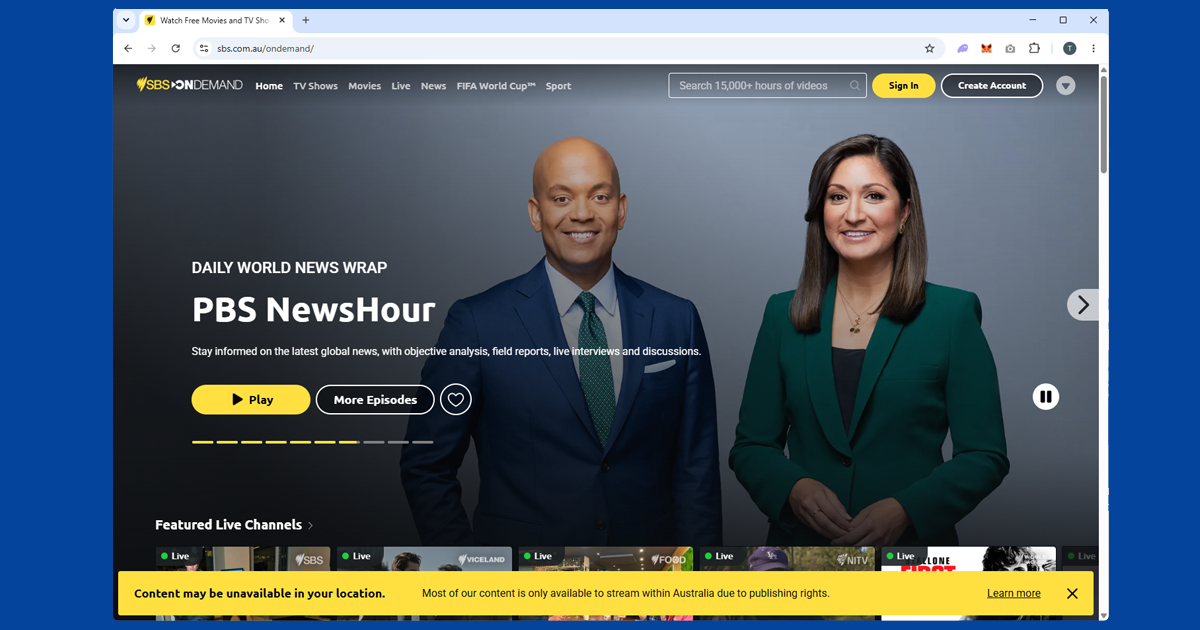
SBS On Demand is run by Australia's Special Broadcasting Service, a publicly funded broadcaster that feels quite different from the commercial Australian streamers. It focuses on foreign language films, international drama, world news, and content in 16 languages, which makes it especially useful for multicultural communities and anyone who wants to watch something beyond English-language TV. It's completely free, no subscription involved.
The catch is that SBS is geo-blocked for everyone outside Australia, Australian citizens included. SBS's own help centre is upfront about it: the restriction is down to licensing agreements and applies no matter where you're from. A VPN connected to an Australian server gives SBS an Australian IP address to read, and the content unlocks.
What's on SBS On Demand
It's worth knowing what you're getting before you set anything up. SBS carries over 15,000 hours of content and organises a good chunk of it by language: there's a browse-by-language section covering Arabic, Chinese, Hindi, Vietnamese, Persian, Danish, and around a dozen others. If you watch content in a language other than English, SBS is probably the most useful of the Australian free streamers for you.
The English-language content is strong too, with a lot of international drama, documentary series, and films that don't tend to make it onto the commercial channels. World news is well covered: SBS WorldWatch pulls in broadcasts from overseas networks. And live TV is included alongside on-demand: SBS On Demand streams six channels in real time, SBS, SBS World Movies, SBS Viceland, NITV (National Indigenous Television), SBS Food, and SBS WorldWatch, all on Australian Eastern time.
Setting up your SBS account
You need a free SBS account to watch. Sign-up asks for your name, email address, birth year, gender, and a postcode. No payment details at any point.
The postcode field is the one that trips people up outside Australia. Just enter any valid Australian postcode: 2000 for Sydney or 3000 for Melbourne both work fine. You don't need to actually live there. After signing up, SBS sends a verification email with an activation link. Click it before you try to stream anything, and check your spam folder if it doesn't arrive quickly.
One thing that catches people out with SBS: you need the VPN connected before you create your account, not just before you watch. The sign-up page can turn away non-Australian IPs, so you end up blocked before you've even started. Get the VPN on first, make the account, and after that you only need it running when you're actually streaming.

Getting it working from abroad
Connect your VPN to Australia before you open SBS On Demand. The site checks your IP the moment the page loads, so the VPN has to be running first.
In NordVPN, find Australia in the server list and choose Sydney or Melbourne. In ExpressVPN, select Australia and pick a city when prompted. Both are reliable. Once you're connected, open sbs.com.au/ondemand in a private or incognito window rather than a regular tab. If you've visited before without a VPN, your browser will have a cached location that SBS can still read even after you connect. A private window starts clean.
Sign in and you should be straight into the library. If you're getting "this content is only available in Australia," the server you've landed on has probably been flagged. Switch to a different Australian server before trying anything else. Our guide on switching VPN servers has the steps for each app.
When it keeps blocking you
SBS can be a bit trickier than 9Now or 7Plus because it checks DNS as well as your IP address. That means a VPN that only changes your IP can still get caught. If our IP checker shows an Australian location but SBS is still blocking you, DNS is the most likely reason.
First try a different Australian server in the same city. Individual IPs get flagged from time to time and a fresh one usually clears it. If that doesn't help, make sure DNS leak protection is turned on in your VPN: in NordVPN, check under Settings > Connection. In ExpressVPN, it should be active by default when you connect, but worth confirming in your settings. Then try switching your protocol to NordLynx in NordVPN or Lightway in ExpressVPN, reconnect, and try SBS again. Our protocol guide walks through it if you need it.
Watching on your TV
SBS On Demand works on Apple TV, Fire TV Stick, Android TV, Samsung, LG, Hisense, Sony, and Panasonic smart TVs, and also on PlayStation 4 and PlayStation 5. That's a wider device list than most of the other Australian streamers.
Most smart TVs and consoles in that list can't run a VPN app directly, so the practical options are either setting up the VPN on your router (which then covers every device on your network automatically) or casting from a phone or laptop that already has the VPN running. Both work well.
Apple TV and Fire TV Stick are the exceptions: both can run a VPN app installed directly on the device. NordVPN and ExpressVPN have native apps for both. Connect to Sydney or Melbourne in the VPN app, then open SBS On Demand directly.
The SBS app on your phone
SBS has iOS and Android apps, but they may not show up in your local store if you're outside Australia. The easiest fix is skipping the app and going to sbs.com.au/ondemand in a mobile browser instead. It works just as well for streaming and sidesteps the store region issue.
If you'd rather have the app, connect your VPN to Australia first and search for it. That sometimes makes it appear. If not, switching your App Store region to Australia in your account settings will let you download it.
Do free VPNs work for SBS On Demand?
Almost never for long. Because SBS checks DNS requests in addition to your IP, it's a more demanding target than a service that only looks at your IP address, and most free VPNs simply don't offer proper DNS leak protection at all. Their server pools are small and widely known too, which means addresses get flagged quickly. If you're after something that works reliably rather than sporadically, a paid VPN with DNS leak protection built in, like NordVPN or ExpressVPN, is really the only sensible option here.
Keeping the picture smooth
SBS's library isn't especially bandwidth-hungry compared with live sport, but a poorly routed VPN connection can still cause buffering, particularly on the live channels. If playback is stuttering: switch to a faster protocol such as NordLynx or Lightway if you haven't already, stay with a well-connected city like Sydney or Melbourne rather than a smaller regional server, and use a wired connection instead of wi-fi if the problem persists during live streams specifically.
SBS compared with 9Now, 7Plus, and 10Play
SBS On Demand is one of four free, ad-supported Australian broadcaster apps, and it's worth understanding how it differs from the others. 9Now and 7Plus are the commercial networks' catch-up services, leaning on Australian reality TV, drama, and soaps. 10Play adds a large slice of CBS content on top of Network Ten's own shows. SBS is the odd one out in the best way: it's the multicultural, multilingual public broadcaster, with over a dozen browse-by-language sections and a strong international drama and documentary catalogue that the commercial services don't really compete with. If you're after non-English content specifically, SBS is generally the best starting point of the four.