FixYourVPN

TVNZ+ is New Zealand's free streaming service, carrying Shortland Street, 1 News, and TVNZ's full catch-up library of local programmes. Outside New Zealand, it checks your location and blocks access before you get to anything. A VPN connected to a New Zealand server gives it a local IP address to check against, and you're in. The service is free, so there's no subscription to deal with.
Getting set up
You need two things: a free TVNZ+ account and a VPN with New Zealand servers. Both are simple to get.
The account is free and just needs an email address. Sign up at tvnz.co.nz with your VPN already connected to a NZ server before you start; signing up from a non-NZ IP address can cause issues. If you're asked for location details during registration, any NZ postcode will do: 1010 for Auckland, 6011 for Wellington, 8011 for Christchurch.
For the VPN, NordVPN and ExpressVPN both have New Zealand servers and work reliably with TVNZ+. Free VPNs tend to get blocked fast. Our IP address checker is a good way to confirm you're showing as NZ before you open the site.
Connecting from abroad
Open your VPN before you open TVNZ+, not after. Connect to a NZ server, wait for it to confirm the connection, then load the site. TVNZ+ checks your location as soon as the page opens, so the VPN has to be running first.
Auckland is the most reliable city to connect to on most providers. In NordVPN, search for New Zealand in the server list and pick Auckland. In ExpressVPN, just select New Zealand and it connects automatically without a city choice. Once connected, open tvnz.co.nz in a private window rather than a regular tab. If you've visited the site before without a VPN, your browser may have stored a location cookie from that session and TVNZ+ will read it. A private window starts fresh with nothing stored.
Sign in and you should be straight into the content. If TVNZ+ is still showing a location error, try switching to a different NZ server. Our guide on how to switch VPN servers has the steps for each app.
What's on TVNZ+
TVNZ+ carries two live channels: TVNZ 1 and TVNZ 2, both on New Zealand time, plus a full catch-up library of everything they've broadcast.
Shortland Street is the biggest reason most Kiwis use TVNZ+ from abroad. It's been on TVNZ 2 since 1992 and has clocked up well over 8,000 episodes, going out three nights a week. You can't watch the current NZ episodes from outside the country without a VPN, and the show isn't on any international streaming platform, so TVNZ+ with an Auckland server is the only real option for Kiwis who want to keep up with it from abroad.
The service also carries 1 News (the main evening bulletin), Sunday (the long-running current affairs show), Fair Go, and a good range of NZ drama and factual content. There's a catalogue of international shows too, licensed for the NZ market, covering US and UK drama, reality TV, and documentary series.
If you're still getting blocked
Visit our IP address checker with the VPN running. If it shows your real country rather than New Zealand, the VPN isn't routing correctly on that server. Switch to a different NZ server, reconnect, and check again before trying anything else.
If the checker shows a NZ location but TVNZ+ is still blocking you, the specific server IP has probably been flagged. Try switching your VPN protocol: in NordVPN, go to Protocol in settings and switch to NordLynx (WireGuard). In ExpressVPN, try Lightway. Reconnect after switching and try TVNZ+ again. Our VPN protocol guide has the steps for each app.
TVNZ+ and Three Now
Three Now is New Zealand's other major free streaming service, run by Three. Like TVNZ+, it's free with a NZ account and blocked outside the country. The content doesn't overlap much: TVNZ+ is where Shortland Street, 1 News, and TVNZ's full catalogue live; Three Now carries programming from Three, including its own locally-produced shows and US content. If you want a broader picture of free NZ TV from abroad, both are worth signing up for since neither costs anything.
New Zealand, not Australia
This trips a surprising number of people up: TVNZ+ needs a New Zealand server specifically, not an Australian one. The two countries get grouped together a lot in casual conversation, but as far as streaming geo-blocks go they're completely separate. An Australian IP that works fine for 9Now or 7Plus will get you the same location error on TVNZ+ as any other non-NZ address. Double check your VPN app is actually showing a New Zealand city, not just "Oceania" or a nearby region, before you assume something else has gone wrong.
What the block looks like, and why it sometimes still shows up
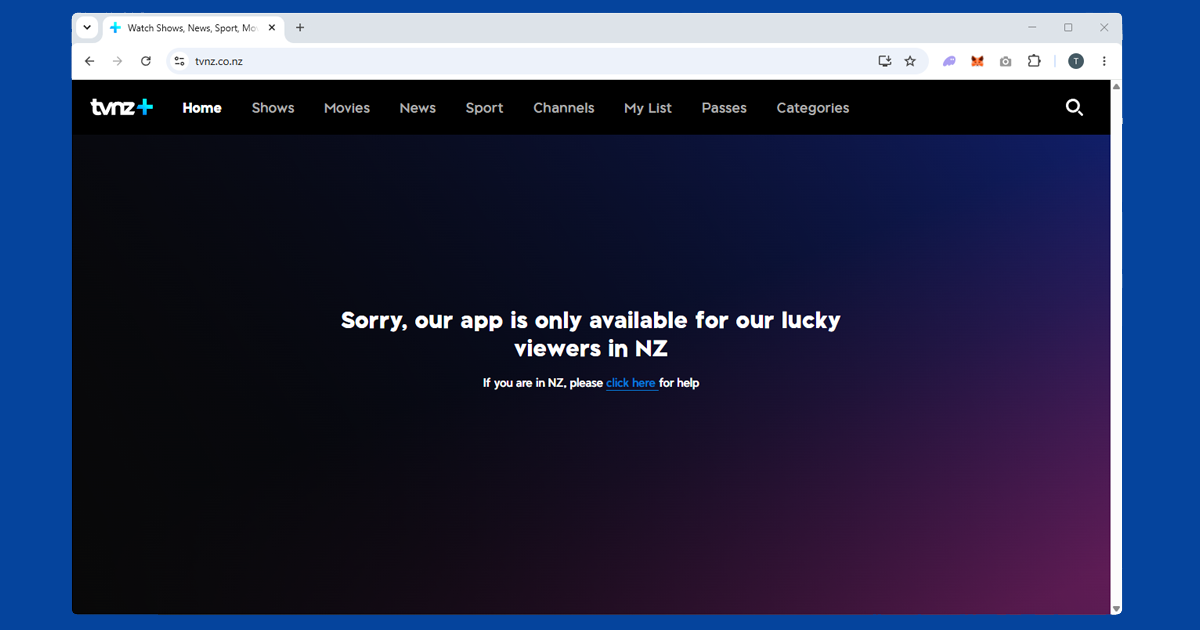
TVNZ+ tends to be fairly direct about it: you'll typically see a message saying the content is only available in New Zealand, sometimes phrased along the lines of the service being for viewers in NZ specifically. If you're seeing this with a VPN connected, the most common cause by far is a leftover browser cookie from a visit before you had the VPN running, which is why the private window step matters more here than it might seem. The second most common cause is a flagged server IP, which a quick switch to a different NZ server usually resolves.
Keeping the stream from stuttering
TVNZ+'s catch-up library isn't particularly heavy on bandwidth, but a slow or overloaded VPN server can still cause stutter, especially on the live channels. If that's happening:
- Try WireGuard. Where your VPN app offers it as a protocol choice, it's generally faster and copes better with sustained streaming than older protocols.
- Stick with Auckland. It's usually the fastest and best-connected NZ city on most providers, and there's rarely a strong reason to pick anywhere else unless Auckland servers are giving you trouble.
- Use a wired connection if you can. It removes the extra jitter wi-fi adds, which becomes more noticeable once a VPN is also in the mix.
Do free VPNs work for TVNZ+?
Not dependably. New Zealand server coverage on free VPNs tends to be thin to begin with, often just a single shared server rather than a proper choice of locations, and that one server gets flagged fast once enough people are routing streaming traffic through it. If you only need a VPN occasionally, it might work once or twice, but for anything you'll want to rely on regularly, a paid VPN with genuine NZ coverage, like NordVPN or ExpressVPN, is worth the modest cost.
On TVs and other devices
TVNZ+ has apps for iOS, Android, Apple TV, Samsung Smart TV, LG Smart TV, and Android TV.
On a phone or tablet, install your VPN app, connect to a NZ server, then open TVNZ+. Make sure you're using the full VPN app on the device and not just a browser extension; extensions only cover browser traffic and won't protect the TVNZ+ app. If the TVNZ+ app doesn't show up in the App Store or Google Play, your store is showing the catalogue for your current country. The easiest workaround is to open tvnz.co.nz in a mobile browser instead; it works just as well for most content without any store region fiddling.
Apple TV has native VPN apps from both NordVPN and ExpressVPN. Connect to a NZ server in the VPN app, then open TVNZ+.
Samsung and LG smart TVs both have native TVNZ+ apps, but you can't install a VPN directly on them. The easiest fix is setting up the VPN on your router: every device on your network gets the NZ IP automatically, including the TV. Chromecast works the same way; cast from a phone or laptop that already has the VPN running.