FixYourVPN

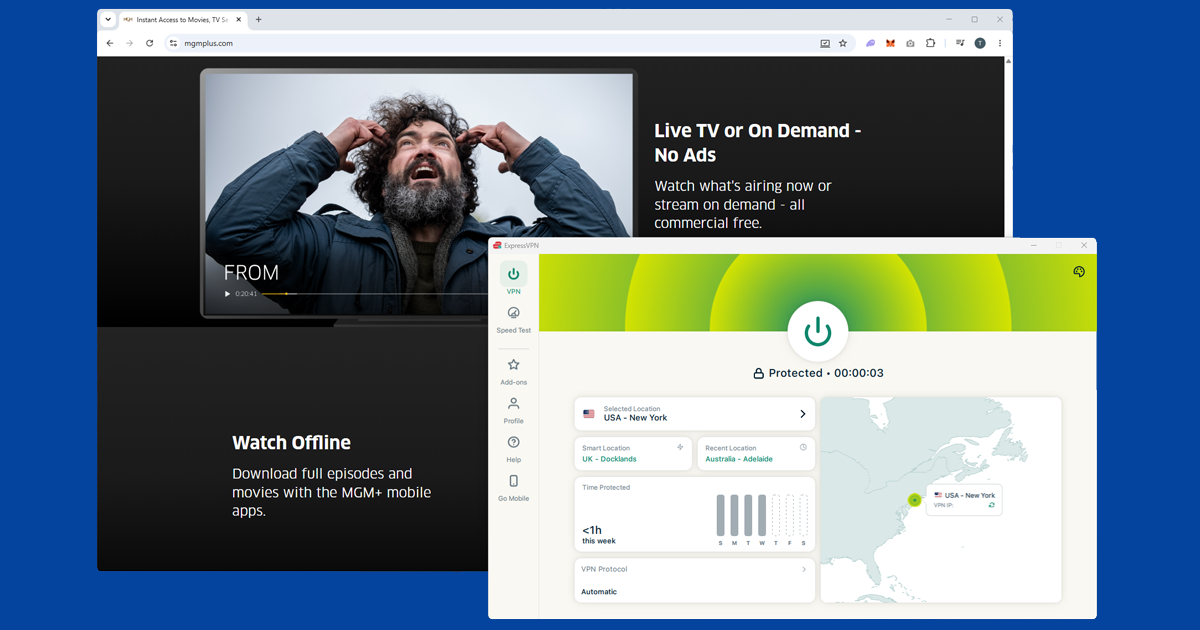
MGM+ (formerly Epix) is a US-only premium streaming service built around the MGM film library and its own original series. If you try to load it from outside the US, you'll get a location error before anything plays. The fix is connecting a VPN to a US server before you open the site or app, which gives MGM+ a US IP address to read and lets you straight in.
What's on MGM+
The MGM film library is the main reason to subscribe. That means the complete James Bond series, the Rocky and Creed films, the Pink Panther films, classic MGM musicals, and decades of other Hollywood titles. Amazon acquired MGM in 2022, which has helped the service grow its library and develop more originals.
On the original series side, From (a horror mystery that has built a big cult following) and Billy the Kid are the flagship MGM+ productions. Hotel Cocaine, a 1970s Miami drama, is another recent addition. There's a solid mix of films and series that you won't find on the bigger streamers like Netflix or Max.
MGM+ is available as a standalone subscription or as an add-on channel through Amazon Prime Video Channels. Check mgmplus.com for current pricing, as it does change from time to time.
Getting MGM+ working from outside the US
The key thing is to connect your VPN before you open MGM+. The location check happens as the page or app loads, so if your VPN isn't already running at that point, you'll get blocked. If MGM+ is already open, close it completely, connect the VPN, then reopen.
On NordVPN, search for United States and pick a city. New York or Los Angeles are good starting points. Once connected, open mgmplus.com in a private or incognito window. The private window step matters: a cached location cookie from a previous visit without the VPN can override your new VPN connection and still show a location error even when you're connected. A fresh private window starts clean.
Using ExpressVPN, select United States and choose a city. MGM+ blocks at the IP level, so individual server IPs do get flagged over time. If New York isn't working, Chicago or Dallas usually will. Our guide to switching servers has the steps for each app.
Signing up for MGM+ from outside the US
If you want to create a new MGM+ account while abroad, you can do it with the VPN connected to a US server. Go to mgmplus.com and sign up as normal. You'll need a payment method that works in the US: an international credit card usually works fine, though if you have trouble with that, a US PayPal account or a US App Store/Google Play gift card (for in-app purchases) are other options.
If you already have an MGM+ account, just connect to a US server and log in. Your existing subscription stays active regardless of where you are.
If you're still seeing a location error
- Check what MGM+ is seeing. Open our IP address checker with your VPN running. If it shows your real country rather than the US, the VPN isn't routing your traffic correctly. Switch to a different server and recheck.
- Try more US cities. Chicago, Dallas, and Seattle are all good options if New York and Los Angeles aren't getting through. Close the browser tab or app fully between each attempt so the location check runs fresh.
- Clear cookies and open a private window. A cached location cookie from a previous visit can stick around even after you connect. Open a fresh private window and load mgmplus.com from scratch.
- Check for a DNS leak. If your DNS requests are leaking outside the VPN tunnel, MGM+ may see your real location even when your IP looks American. Our DNS leak guide covers how to check and fix it in each app.
The MGM+ app on mobile and TV
MGM+ has iOS and Android apps. Install your VPN app, connect to a US server, and then open the MGM+ app. You need a full system VPN app here, not a browser extension: extensions only cover traffic inside the browser, not the MGM+ app itself. If the MGM+ app isn't available in your local App Store or Google Play because of your region, the website at mgmplus.com in a mobile browser is a reliable alternative.
For smart TVs, MGM+ is available on Apple TV, Fire TV, Roku, and Samsung Smart TVs. If your TV supports a VPN app (Fire TV does, for example), install it there and connect before opening MGM+. For TVs that don't support VPN apps directly, setting up the VPN on your router means every device on your home network gets the US connection automatically, including your TV.
How MGM+ compares to AMC+
If you're already reading about premium add-on channels, it's worth knowing how MGM+ sits next to AMC+, since the two get mentioned in the same breath a lot. Both are US-only, both work as standalone subscriptions or as Amazon Prime Video Channels add-ons, and both unblock the exact same way with a US VPN server.
The difference is content: MGM+ leans on the MGM film library and a smaller slate of originals, while AMC+ bundles in Shudder, Sundance Now, and the larger AMC original drama catalogue. If you're deciding which to subscribe to, it comes down to whether you want the Bond and Rocky catalogue or AMC's prestige dramas, not which one is easier to access abroad.
Is it worth using a free VPN for MGM+?
In our experience, not really. Free VPNs typically run a small pool of servers shared across a large number of users, and US IP addresses from that pool get flagged by streaming services like MGM+ quickly and often stay flagged. Even where a free VPN does get through, the connection is usually slower, which shows up as buffering on anything beyond standard definition.
Most free plans also cap your monthly data at a level that a couple of films will use up. If you're only going to need a VPN for a short trip, a monthly plan with a paid provider is still going to be far more dependable than a free one. Our guide to free VPN safety covers the other trade-offs, including what free providers tend to do with your data.
Picking a VPN that actually holds up for MGM+
Server count matters more than most people expect here. MGM+ blocks individual data-centre IP addresses as they get reported, so a VPN with only a handful of US servers runs out of working options fast. NordVPN and ExpressVPN both maintain large US server networks spread across multiple cities, which gives you plenty of fallback options if one gets flagged.
Speed is worth weighing too, particularly if you're planning to work through the MGM film catalogue in decent quality: a slower VPN connection is the most common cause of buffering once you're actually past the location check.
Terms of service note: MGM+'s terms restrict streaming to users located in the US. Using a VPN from elsewhere technically falls outside that policy. Enforcement in our experience is limited to a blocked stream on a flagged server rather than account action, but it's part of the actual terms, not an unenforced technicality.