FixYourVPN

10Play is Network Ten's free streaming service, and if you're an Australian living abroad or just travelling, it's probably one of the services you miss most. You get the full back catalogue of Ten's shows, live simulcasts of Channel 10, 10 Bold, and 10 Peach, and a big library of CBS content, all free with ads. No subscription, no payment details required.
The catch is it's geo-locked to Australia. Step outside the country and you'll hit a location error as soon as you try to play anything. An Australian VPN server fixes it in a couple of minutes. Here's how to do it in five steps.
1. Connect your VPN to an Australian server
10Play checks your IP address the moment you try to play something, so your VPN needs to be running before you open the site or app. If 10Play is already open in your browser, close the tab completely, get the VPN connected, and then reopen it.
With NordVPN, search for Australia in the server list and connect to Sydney. It's the most reliable city to start with and usually works on the first try.
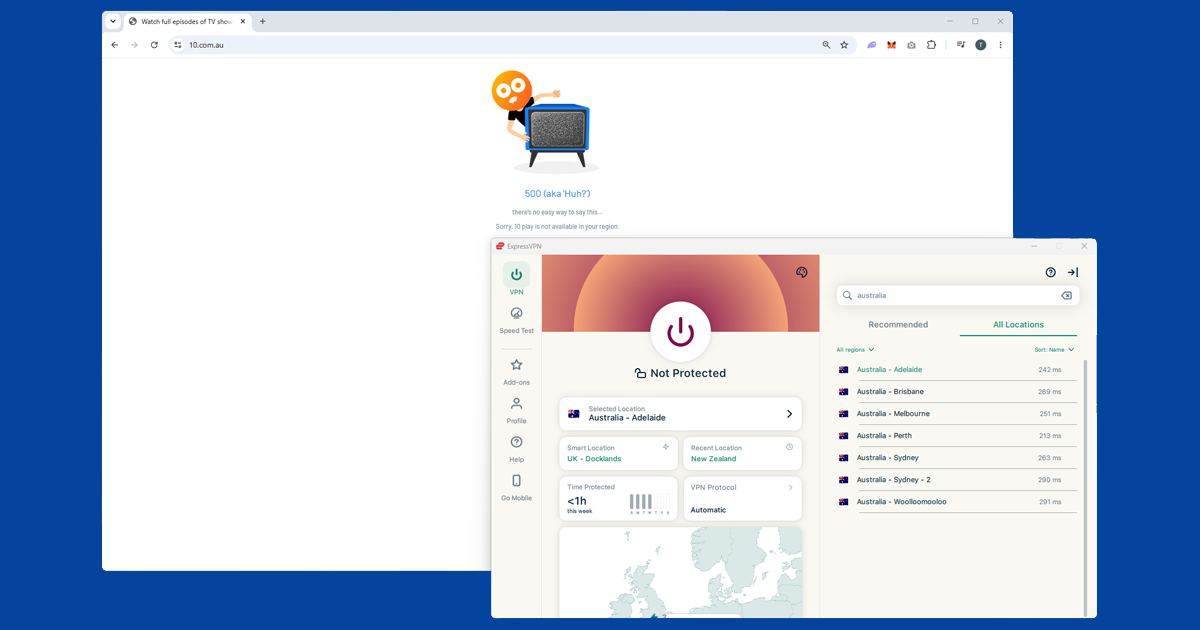
On ExpressVPN, select Australia and pick a city. 10Play's geo-blocking is less aggressive than most paid services, so Sydney servers tend to get you straight in. Our guide to switching servers has the steps for each app if you need to try a different city.
2. Open 10Play in a private window
Once your VPN is connected, open 10play.com.au in a private or incognito window rather than your regular browser. This is a small but important step: if you've visited 10Play before without a VPN, your browser may have cached a location cookie that tells 10Play you're outside Australia. A fresh private window starts clean with no stored location data, so the VPN connection is what 10Play sees first.
3. Register your free account
10Play requires a free account to watch anything, but there's no subscription fee and no payment details needed. Just an email address and a password. Sign up on the site with the VPN connected; it only takes a minute. Once you have an account, you're logged in from any device and your watch history carries across.
If you already have a 10Play account, just log in as normal with the VPN running.
4. What you can actually watch
10Play is one of the best free streaming services for Australian expats, partly because of what's on it and partly because there's nothing to pay. The content library has two main pillars.
The first is CBS content. 10Play holds CBS rights in Australia, which means NCIS and its spin-offs, the FBI franchise, Survivor (current and older seasons), The Amazing Race, and The Late Show with Stephen Colbert. If you watch US network TV, a large chunk of what airs on CBS is on 10Play for free.
The second is Network Ten's Australian programming. The Project and Studio 10 for news and current affairs, Australian Survivor and The Bachelors for reality TV, and archived Neighbours episodes going back years. 10Play also carries live simulcasts of Channel 10, 10 Bold (classic and older content), and 10 Peach (movies and US series). So you can watch live Australian television from anywhere, which is something most paid streaming services don't offer.
5. Watching on your phone, tablet, or TV
10Play has official iOS and Android apps. Install your VPN app first, connect to an Australian server, then open the 10Play app. If the 10Play app isn't showing in your local App Store or Google Play because of your region, 10play.com.au in a mobile browser works just as well and doesn't require any region switching.
For smart TVs and streaming devices, 10Play is available on Apple TV, Chromecast, and Android TV. You'll need your VPN running on the same network, which usually means setting it up on your router so every device gets the Australian connection automatically. Some routers support VPN apps directly; if yours doesn't, check your VPN provider's router setup guide.
What the error actually looks like
10Play doesn't always give you a clear "you're outside Australia" message. Sometimes it's a location message along the lines of content not being available where you are; other times the page just throws a generic error code and refuses to load anything at all, which is more confusing because it doesn't obviously point at your location. Either way, the cause is almost always the same: 10Play couldn't confirm an Australian IP address at the moment the page loaded. Reconnecting your VPN and reloading from a fresh private window clears both versions of the error in most cases.
One thing worth ruling out separately: if the page loads fine but a specific show refuses to play while everything else works, that's usually a rights issue rather than a location block. Some CBS content is licensed on a title-by-title basis and occasionally gets pulled or delayed, which has nothing to do with your VPN.
Getting a smooth, buffer-free stream
10Play isn't especially demanding compared with live sport on Kayo, but a slow or badly routed VPN connection will still show up as buffering, especially on the live channel simulcasts. A few things help:
- Use WireGuard where it's offered. It's the fastest protocol most VPN apps support and copes better with a sustained video stream than older options.
- Pick the closest Australian city. Sydney tends to have the biggest server capacity, but if you're watching from Asia or the Middle East, a Perth server (where available) can actually give you a shorter route and a steadier stream.
- Close other devices sharing the connection. A VPN adds a small amount of overhead, and it's more noticeable if your household wi-fi is already stretched thin by other streaming or downloads.
Do free VPNs work for 10Play?
Not reliably. 10Play's blocking isn't as aggressive as Kayo's or Binge's, so a free VPN might get you in on a good day, but free services typically run a tiny pool of shared server addresses that get used, flagged, and blocked far faster than a paid provider can replace them. You're also likely to hit data caps or painfully slow speeds that make even a simple catch-up episode a chore to watch. If you're only planning to use a VPN for something like this, a paid plan is a much smaller outlay than the frustration of a free one failing every other week.
What to do if 10Play keeps blocking you
- Check what 10Play is seeing. Open our IP address checker with your VPN connected. If it shows your real country rather than Australia, the VPN isn't routing correctly. Disconnect, reconnect to a different server, and check again.
- Clear cookies and use a private window. A cached location from a previous unprotected visit can persist even after connecting. Open a fresh private window and load 10play.com.au from scratch.
- Try Melbourne instead of Sydney. If Sydney servers keep giving a location error, Melbourne is the next best option. Individual server IPs do get flagged occasionally, and switching cities usually finds one that works.
- Check for a DNS leak. A DNS leak can reveal your real location even when your IP looks Australian. Our DNS leak guide covers how to check and fix it in each app.
10Play compared with 9Now, 7Plus, and SBS
10Play is one of four free, ad-supported Australian broadcaster apps that are all geo-locked the same way, and if you're setting one up it's genuinely worth doing all four while your VPN is connected, since none of them cost anything.
- 10Play: Network Ten's own news, reality, and drama output, plus CBS content under Ten's licensing deal, including NCIS, Survivor, FBI, and The Amazing Race.
- 9Now: Channel Nine's equivalent, leaning heavily on Australian reality TV like The Block and Married at First Sight.
- 7Plus: Channel Seven's version, and where Home and Away lives.
- SBS On Demand: sits apart from the other three as the multicultural and multilingual public broadcaster, with a large amount of content in languages other than English.
None of the four overlap much, so if you're missing Australian telly from abroad, it's worth registering for more than just one.