FixYourVPN

Steam is a bit unusual as an app because a VPN can affect three completely separate things: browsing the store and community, downloading games, and playing them. The fix for each is different, and it's worth knowing which one is actually broken before you start changing settings.
1. Steam is blocked at school or work
When a school or office network blocks Steam, it usually catches everything at once: the store won't load, updates stall, and the client itself refuses to connect. Content filters identify Steam's traffic by category or domain and drop it before it gets anywhere.
Connect the VPN first, then open Steam. If Steam already tried to connect before the VPN was up, it may have cached the failure. Close it completely, get the VPN connected, then launch it fresh.
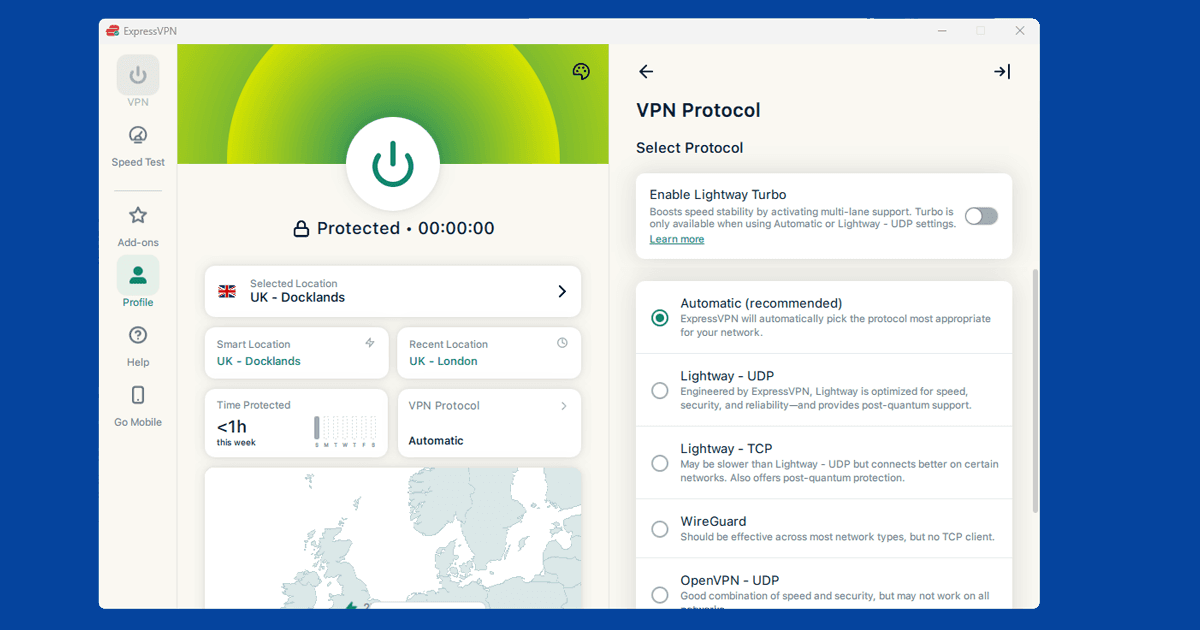
If the VPN itself won't connect on the network, the IT department has stacked VPN blocking on top of the Steam block. The workaround is OpenVPN TCP on port 443, the same port used by every HTTPS website. Blocking it would take down web browsing for the whole network, so it's almost always left open. In NordVPN: Settings > VPN Protocol > OpenVPN (TCP). In ExpressVPN: Settings > Protocol > OpenVPN (TCP). Our protocol guide walks through it for every major app.
At university? Our university wi-fi guide is worth reading, as campus networks tend to have their own specific quirks beyond a standard office block.
Expect a Steam Guard email the first time you log in through a new VPN location. Steam sees a new IP address and sends a verification code to confirm it's you. Enter it and you're in. It's not a flag on your account, just Steam's standard two-step check.
2. Steam is unreliable where you are
Steam isn't formally banned in many countries, but it does struggle in certain places. China is the most common one. The global Steam store and community hub are unreliable there because Chinese ISPs handle the traffic poorly. It's not a hard block the way social media is, but in practice it often amounts to the same thing. Valve launched a separate Chinese Steam service in 2021, but its library is a fraction of the global one. If you want the full catalogue from China, a VPN server outside the country is the route.
Countries with heavy internet filtering more broadly can also affect Steam's ability to connect, receive updates, or pull down game files, sometimes independently of whether you can access the store. If Steam worked fine before you arrived somewhere and stopped after, a VPN connected to a server with open internet access and a fresh Steam launch usually sorts it.
Where the government also blocks VPN protocols, you need obfuscation. NordVPN's Obfuscated Servers wrap your VPN traffic to look like standard HTTPS, which is much harder for national firewalls to catch. Find them under Settings > Advanced. On ExpressVPN, Lightway TCP achieves the same thing.
3. Games are lagging with the VPN on
Steam is a store, a launcher, and a social platform, but for lag the part that matters is how your connection reaches the game's own servers, and a VPN changes that route. What works well for downloading a game (where speed matters but not milliseconds) can work badly for playing it.
Steam has a Download Region setting that controls which of Valve's content servers your client pulls files from. Open Steam, go to Settings > Downloads > Download Region and pick somewhere that matches your VPN server's location. If your VPN is connected to a UK server but Steam's download region is set to somewhere in Asia, you'll get mismatched routing and slower downloads. For gameplay, the situation is different: your in-game ping depends on which game server you connect to, not the Steam download servers. Set your VPN to match the region you want to play in.
On the protocol side, NordLynx (NordVPN) is built on WireGuard, and Lightway UDP (ExpressVPN) is ExpressVPN's own low-overhead protocol with a similar design philosophy. Both add significantly less processing overhead than OpenVPN. For anything real-time (ranked matches, anything where 20ms matters), they're worth switching to.
If you're running a VPN purely for privacy and not to bypass any block, there's a cleaner option. Split tunneling lets you route Steam outside the VPN entirely while keeping everything else on it:
- NordVPN (Windows/Android): Settings > Split Tunneling > add Steam to the excluded apps list
- ExpressVPN: Options > General > Split tunneling > "Do not allow selected apps to use the VPN" > add Steam
Steam downloading and Steam gameplay can also be split independently this way: you might want downloads going through the VPN (to avoid ISP throttling) but gameplay going direct (for lower ping). It's worth experimenting.
Most people play with Discord open alongside Steam for voice chat, and it's worth excluding that too if you're splitting Steam out for ping reasons. Our Discord VPN guide has the gaming-specific split tunneling steps.
Before you assume the VPN itself is the problem, it's worth confirming it's actually doing what you think it is. A VPN app can say "connected" while still leaking your real location through DNS, which won't touch your ping but can explain other odd behaviour like region mismatches. Our quick VPN diagnostic checks take about two minutes and rule that out.
4. A game isn't available in your region
Publishers sometimes license games territory by territory, and content rating decisions can prevent specific titles from being sold in certain countries. A VPN set to a country where a game is available lets you purchase and download it.
One thing to check before you buy: availability and activation are different restrictions. A game might appear in the store when you're connected to a particular region, but still carry a regional activation lock that prevents it working outside that territory. SteamDB has region availability data for most games, worth a look before purchasing anything you're not sure about.
Steam can also temporarily restrict purchasing if it detects frequent region-switching. Keeping your VPN on one location when you're buying avoids triggering that.
5. Don't use a VPN to buy games at lower regional prices
Steam prices vary substantially by country. The gaps can be eye-catching. But buying games through a VPN to take advantage of cheaper regional pricing breaks the Steam Subscriber Agreement, and Valve bans accounts for it. Permanently. There's no appeal process that reliably works, and no exceptions. Reports of this happening appear on Steam forums and subreddits often enough that it's a well-documented risk, not a theoretical one.
Access, privacy, better ping: all fine. Pricing arbitrage: the one thing that actually gets accounts closed.
6. Remote Play and Family Sharing over a VPN
Steam Remote Play streams your gameplay from one device to another over the network, and it's more sensitive to latency and route stability than most other Steam features. Running a VPN on the streaming device, the receiving device, or both adds an extra hop to that connection, and on a slower or more distant server it can be enough to introduce noticeable input lag. If Remote Play feels sluggish with a VPN active, try a server that's close to your actual location rather than one picked for region-unlocking, or disconnect the VPN for that session if you don't need it for anything else.
Family Sharing (letting another Steam account borrow your library) generally isn't affected by a VPN in the way purchases are, since it's tied to your account and device authorisation rather than IP location. That said, if you're setting it up for the first time on a device connected through an unfamiliar VPN location, don't be surprised if Steam asks for extra verification. That's the same Steam Guard behaviour covered below, not a sign that Family Sharing itself has broken.
One more thing worth flagging honestly here: we haven't tested every combination of VPN provider and Remote Play setup ourselves, so if you hit an edge case that doesn't match what's described above, Steam's own support forums are a good place to check whether it's a known issue.