FixYourVPN

Stan is one of Australia's main streaming services, home to a mix of US network content, Stan originals, and catalogue titles across drama, comedy, and film. Like most region-locked services, it checks your IP address when you load the app or site, and outside Australia you'll get a location error. A VPN connected to an Australian server fixes it.
What's on Stan
Stan built its reputation on a strong originals slate. The Tourist, starring Jamie Dornan, was one of Stan's biggest hits and has two seasons. Wolf Like Me (Isla Fisher and Josh Gad), Bump, and Savage River are Australian originals that sit alongside international co-productions. Stan also carries CBS programming and a library of Showtime titles (Billions, Yellowjackets, Dexter: New Blood). Paramount+ is a separate, standalone service in Australia rather than a Stan add-on, so if you're after Paramount+ specifically, that's a different subscription entirely. For Australian expats, Stan is often the first service people reach for when they want locally-produced content or the US network shows they watched at home.
Check stan.com.au for current pricing; Stan has updated its subscription tiers and pricing over the years and the details change.
Getting Stan working from outside Australia
Connect your VPN to an Australian server before opening Stan. The service checks your location when the page or app loads, so the VPN needs to be active first. If Stan is already open, close it completely, connect the VPN, then reopen.
If you're on NordVPN, search for Australia in the server list. Sydney is the most reliable starting point. Once connected, open stan.com.au in a private or incognito window. A private window starts clean, with no cached location data from any previous visit without a VPN. Sign in and you should be straight into the library.
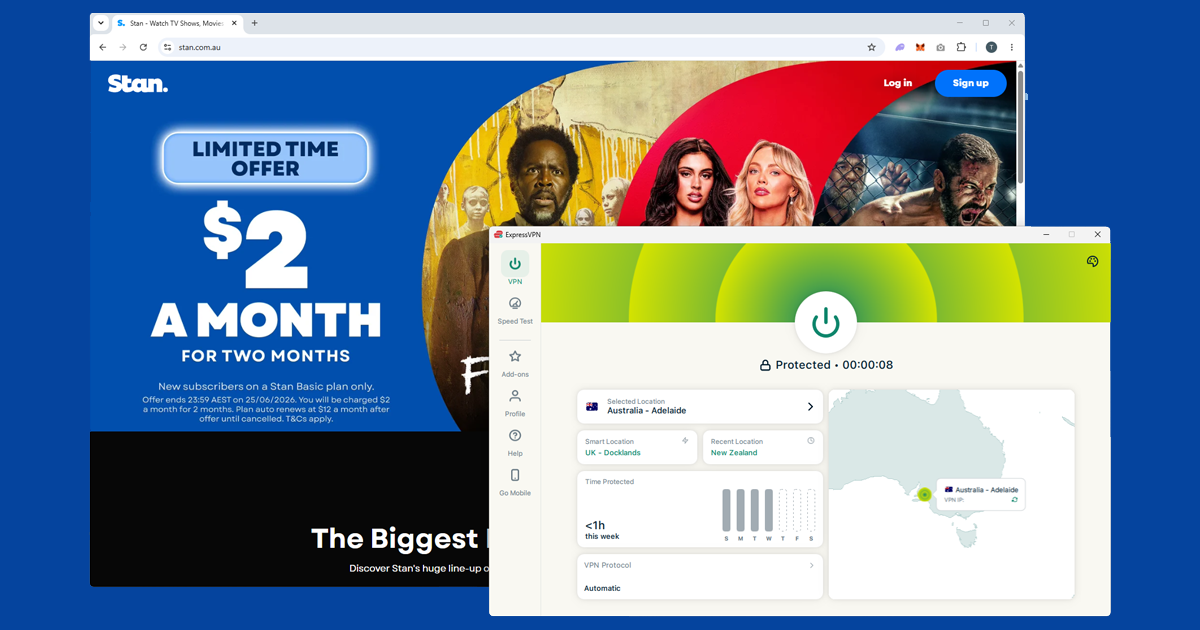
With ExpressVPN, select Australia and pick a city. Stan does a straightforward IP check on load rather than the more aggressive detection some global services use, so it's generally one of the easier Australian services to get working. If the first Sydney server gives a location error, try a second Sydney server before switching to Melbourne. Stan blocks individual IPs rather than VPN providers entirely, so another server in the same city usually does it. Our guide to switching servers has the steps for each app.
Signing up for Stan from outside Australia
If you want to create a new Stan account while abroad, connect your VPN to an Australian server first, then go to stan.com.au and sign up as normal. International credit cards generally work fine for the payment step. If you hit a payment issue, a prepaid Australian Visa or Mastercard (available online) is another option. Stan offers a free trial for new subscribers, so you can test everything before committing to a paid plan.
If you already have a Stan account, just connect to an Australian server and log in. Your existing subscription stays active regardless of where you are physically.
If Stan keeps blocking you
- Check your IP. Open our IP address checker with your VPN connected. If it shows your real country rather than Australia, the VPN isn't routing correctly. Reconnect and recheck before going further.
- Clear cookies and use a private window. A previous visit to Stan without a VPN can leave a location cookie. Clear your browser cookies or open a fresh private window and load stan.com.au from scratch.
- Enable DNS leak protection. A DNS leak can expose your real location even when your IP looks correct. In NordVPN, check under Settings > Connection. Our DNS leak guide covers the fix for each app.
- Try a different protocol. Switch to NordLynx in NordVPN or Lightway in ExpressVPN, reconnect, then try Stan again.
Stan on mobile and TV
Stan has iOS and Android apps. Install your VPN app, connect to an Australian server, then open Stan. If the Stan app isn't available in your local App Store because of your region, stan.com.au in a mobile browser works well, or you can switch your App Store region to Australia to download the app directly.
For TVs and streaming devices: Stan is available on Apple TV, Chromecast, Android TV and Google TV, Samsung Smart TVs, LG Smart TVs, and Sony Bravia TVs. NordVPN and ExpressVPN both have native Fire TV apps, which makes Fire TV Stick one of the easier TV setups. For smart TVs that don't support VPN apps directly, setting up the VPN on your router is the most reliable option: every device on your home network gets the Australian connection automatically.
Do you need to keep paying for Stan while you're away?
If you're travelling rather than emigrating permanently, the simplest approach is usually to just keep the subscription running and connect through a VPN whenever you want to watch, the same as you would for any other account you keep active while abroad. Cancelling and resubscribing later means losing your watchlist and continue-watching history, so unless you're going to be away for a long stretch, it's rarely worth the hassle for what a Stan subscription costs per month.
If you do decide to pause it, you can resubscribe later and sign back in with an Australian VPN server the same way as setting it up fresh.
Which VPN is actually worth using for Stan
Stan isn't the hardest Australian service to unblock, but a VPN with a decent, well-maintained Australian server pool still makes a noticeable difference. NordVPN and ExpressVPN both keep multiple Sydney and Melbourne server options and refresh their IP addresses regularly enough that you rarely need to try more than two servers before getting through.
Speed matters more here than with some other services too, since Stan streams a lot of content in high definition, and a slower or overloaded VPN server is the most common cause of buffering once you're actually connected. Whichever VPN you use, a server physically closer to Australia (or one your provider labels as an Australian streaming-optimised server, if it offers one) tends to hold up better over a long viewing session than a distant, general-purpose one.
Terms of service note: Stan's terms restrict access to users physically located in Australia. Using a VPN from elsewhere technically falls outside that policy. In practice, enforcement means a blocked stream that clears when you switch servers, not account suspension, but it's worth knowing the policy exists before you rely on it long-term.
Does a free VPN work for Stan?
Not reliably. Free VPNs tend to operate a small number of servers shared across a large number of users, and those Australian IP addresses get flagged by services like Stan fairly quickly. Even when a free VPN does get you in, the connection is often too slow for smooth high-definition playback, and most free plans cap your monthly data at a level a few episodes of anything will burn through.
If you're only going to use a VPN occasionally, a short-term or monthly plan with a proper paid provider is still going to be more dependable than a free option. Our guide to free VPN safety covers the other risks worth knowing about, including data logging and selling.