FixYourVPN

If you're in the UK or most other countries outside China, you can watch iQIYI without a VPN. The international version of the platform (iq.com) is officially available worldwide, with English subtitles and a free ad-supported tier. A VPN is only needed if you want the China-only version, or if a specific title you're looking for is geo-blocked in your country.
Which version of iQIYI do you need?
iQIYI runs two completely separate platforms. Most people outside China want iQIYI International (iq.com): it's designed for international audiences, carries a large selection of Chinese and Asian dramas with English subtitles, and is free to access with ads. No VPN needed.
iQIYI China (iqiyi.com) is a different service with a much larger catalogue, but it's restricted to mainland Chinese IP addresses. If you want specific shows only available on the China version, that's where a VPN comes in, though it's a more involved process.
Some iQIYI original dramas are also licensed to other platforms available outside China, including Amazon Prime Video in the UK, so check there first if you're looking for a specific title.
Accessing iQIYI China from outside China
To watch the main iQIYI China platform (iqiyi.com) from outside China, you need a VPN that offers a China virtual server: a server physically located elsewhere that gives you a mainland Chinese IP address. This is considerably harder than most VPN setups. Most mainstream providers, including NordVPN and ExpressVPN, don't currently offer China servers.
PureVPN is one provider that does currently offer China servers. Before subscribing to any VPN specifically for this purpose, verify that China still appears in their current server list, as availability can change. Even with a Chinese IP, some content on iQIYI China requires a China-registered account and a Chinese payment method for premium tiers, so a VPN alone may not unlock everything.
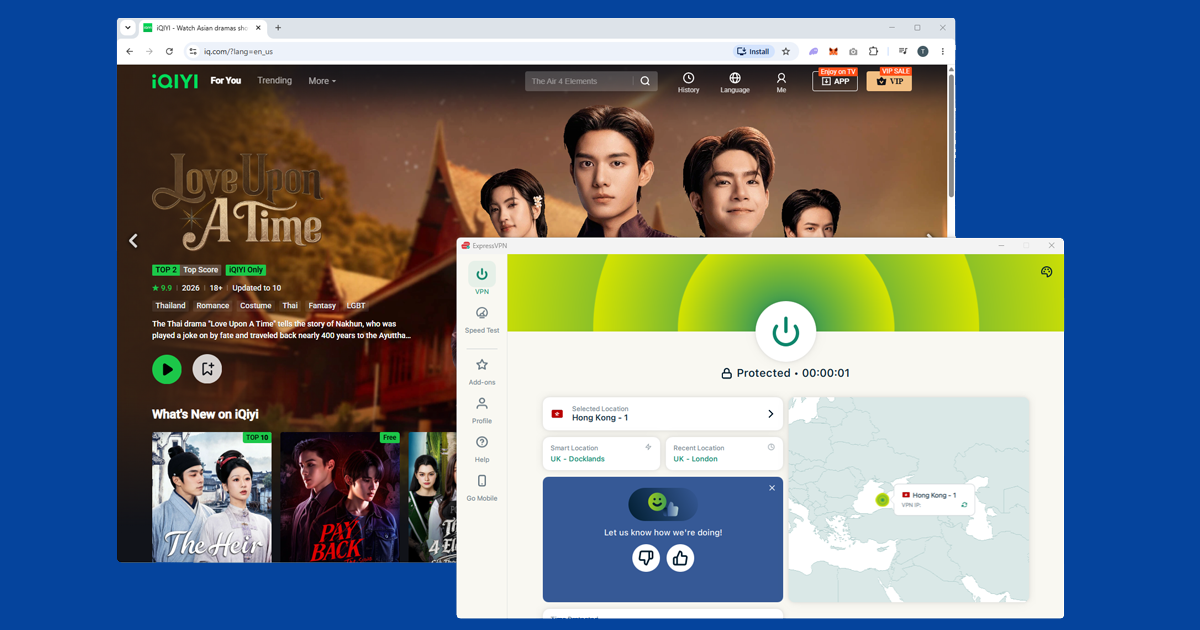
Use a Singapore or Hong Kong server for iQIYI International
iQIYI International is available in most regions, but it's blocked in some. If you're in a country where intl.iq.com doesn't load, connect your VPN to a server in Singapore, Hong Kong, or Malaysia. These are iQIYI International's primary markets and the platform works well from those locations. NordVPN and ExpressVPN both have Singapore and Hong Kong servers that work reliably for iQIYI International.
Hong Kong works for iQIYI International, but it won't work for iQIYI China. Despite being close geographically, iQIYI China treats Hong Kong as a separate region and requires a mainland Chinese IP. If you need the China version, you need a China virtual server specifically.
Switch server and clear cookies if still blocked
If you get an access error after connecting, switch to a different server in the same target country and try again. As with other streaming services, iQIYI blocks known VPN IP addresses. A fresh server that isn't on the blocked server list will usually get through. See our guide on switching VPN servers for detailed steps.
Clear your browser cookies and open a private window after connecting your VPN if you've accessed iQIYI before without one: cached location data from the previous session can cause blocks even with a valid server. See our guide on clearing cache and cookies.
If switching servers doesn't help, run a DNS leak test at ipleak.net with your VPN connected. If your home internet provider appears in the results, your real location is leaking. Follow our guide to fixing a DNS leak.
Change your VPN protocol
If a server connection to iQIYI is failing or dropping, changing your VPN protocol often resolves it. In NordVPN, go to Settings Connection VPN Protocol and try switching between WireGuard and OpenVPN. OpenVPN TCP is often more reliable on networks with strict filtering. Our guide on changing your VPN protocol covers all the major apps.
What's on iQIYI International?
iQIYI International carries Chinese and Korean dramas, variety shows, films, and anime, all with English subtitles (and other languages). The catalogue is a curated selection rather than the full China library: content is picked for international audiences and separately licensed for distribution outside mainland China. Popular genres include romance dramas, historical epics, and idol variety shows.
If you're looking for a specific Chinese title, search iQIYI International first. If it isn't there, it may only be available on iQIYI China, which requires a Chinese server and, for premium content, a China-registered account.
Do free VPNs work for iQIYI?
Not well, in most cases. iQIYI International's free ad-supported tier is generous enough that plenty of people don't need a VPN for it in the first place, but if you do need one to get past a regional block, a free VPN tends to struggle. Free services typically run a small pool of servers shared between a huge number of users, and Singapore and Hong Kong IPs get hammered particularly hard because so many people are trying to reach the same handful of Asian streaming platforms through them.
The result is slow buffering, frequent drops, and IP addresses that get added to iQIYI's block list faster than a paid provider can rotate them out. There are also privacy trade-offs worth knowing about before you install a free VPN; our guide to free VPN safety covers what to check.
If iQIYI loads fine but the video keeps stalling, that's usually about server distance and load rather than a block. Picking a server that's geographically closer to you, instead of always defaulting to Singapore, and switching to WireGuard if your app supports it, both tend to help. Our guide to VPN speed goes into this in more depth if buffering keeps happening no matter which server you pick.
iQIYI on Samsung and LG smart TVs
Native VPN app support on Samsung and LG smart TVs is limited, so even if iQIYI is available on your model's app store, you'll usually need to set the VPN up somewhere else on your network rather than on the TV directly. The two practical options are running the VPN on your home router, which covers every device connected to it automatically, or turning a phone or laptop into a personal hotspot with the VPN active and connecting the TV to that instead. Both work; the router option is more reliable if you'll be watching regularly, since it doesn't depend on another device staying switched on.
If you travel between countries a lot and rely on iQIYI, Youku, or Viu regularly, it's worth turning on your VPN's kill switch too. It stops your device quietly falling back to your real IP if the connection drops mid-session, which is exactly the kind of thing that causes a previously working setup to suddenly throw a location error again. Our kill switch guide covers how to enable it in the major apps.
If your VPN won't connect at all
If your VPN isn't connecting before you've even tried iQIYI, the issue is with the VPN itself rather than the service. Try these steps:
- Check your VPN app shows a connected status, not just that the app is open
- Disconnect, wait 10 seconds, and reconnect to the same server
- Try a different server in the same country
- Switch your VPN protocol to WireGuard or OpenVPN in the protocol settings
- Restart the VPN app completely and reconnect
If you've been through all of that and you're still stuck, our free VPN troubleshooter will walk you through diagnosing the problem from scratch.