FixYourVPN

Hayu is NBCUniversal's dedicated reality TV service: Real Housewives (the full franchise), Keeping Up with the Kardashians, Below Deck, Million Dollar Listing, Vanderpump Rules, Top Chef, and hundreds of other unscripted titles. It's available in the UK, Ireland, Australia, Canada, and the Nordic countries. If you're somewhere else and you want in, a VPN server in one of those countries is all you need. Hayu is one of the easier services to get working from abroad because it doesn't use particularly aggressive VPN detection, and everything on it is on-demand, so you're not fighting the kind of real-time location checks that a live sports platform runs.
Which country server to use
The UK is the best starting point. It has Hayu's fullest library and the widest choice of VPN servers, and UK servers almost always work on the first try. If you have an existing UK Hayu account, a UK server will restore access immediately. Ireland and Australia are just as good if you have an account registered there, as both carry the same core library.
If you're in the US and want to sign up for Hayu (it's not available there at all), a UK or Irish server is the one to use. You'll need to sign up through the UK or Irish website, which you can do with the VPN connected.
How to connect and watch
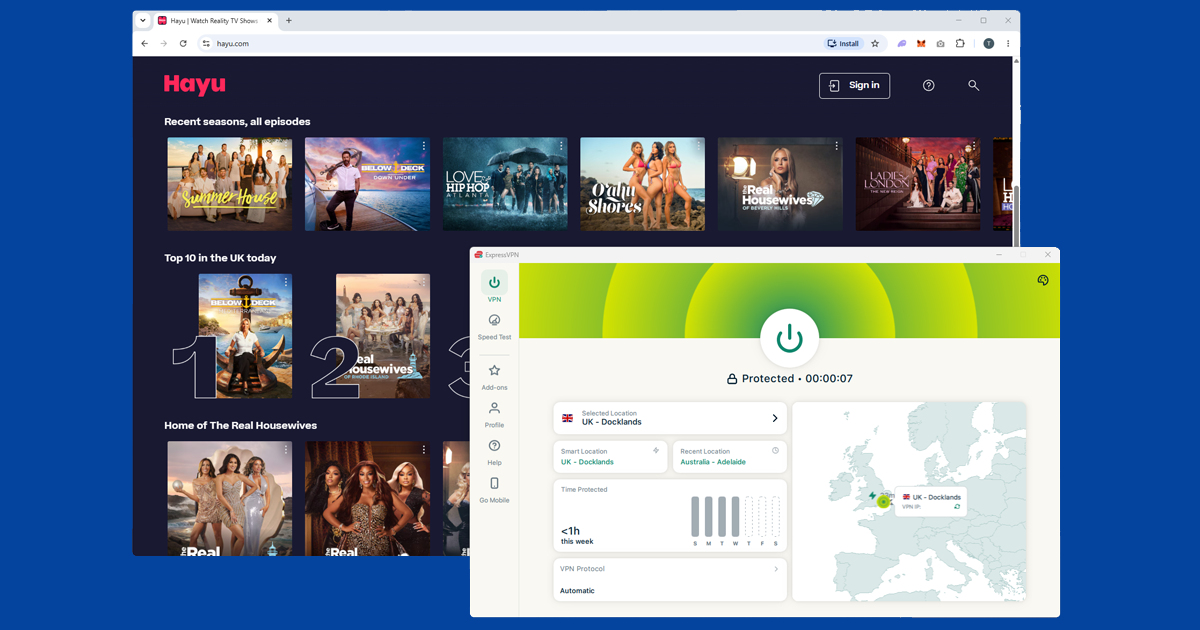
Connect your VPN to a UK server before opening Hayu. The location check happens when the page loads, so the VPN needs to be active before you get there, not after. This is the most common reason people get a location error even with a VPN running: they open the site first, then switch the VPN on.
Using NordVPN, search for United Kingdom in the server list. London is the most reliable city. Once connected, open hayu.com in a private or incognito window to avoid any cached location data from a previous visit without the VPN. Sign in and you should be straight into the library.
If you're on ExpressVPN, select United Kingdom and pick a city. If the first server gives a location error, try a different UK city. Our guide to switching servers has the steps for each app.
What's actually on Hayu
Hayu is entirely reality TV, pulled from NBCUniversal's Bravo and E! networks, plus a growing pile of originals it's picked up along the way. The Real Housewives franchise is the flagship: New York, Beverly Hills, Atlanta, Salt Lake City, New Jersey, Orange County, Potomac, and most of the international spinoffs too, all in one place rather than scattered across different services. Below Deck and its various spinoffs (Below Deck Mediterranean, Below Deck Down Under, Below Deck Sailing Yacht) are another big draw, along with Vanderpump Rules, Million Dollar Listing, Top Chef, and Married to Medicine.
What tends to surprise people who've only ever thought of Hayu as "the Real Housewives app" is how quickly it turns around new episodes. Most US-originated shows land on Hayu within a day of broadcasting in America, sometimes on the same day, which is faster than a lot of scripted content makes it onto UK platforms. If you're trying to stay ahead of spoilers on social media, that turnaround matters.
Free trial, pricing, and what you actually need to pay for
Hayu doesn't have a free ad-supported tier the way something like CBC Gem or Pluto TV does. It's a paid subscription service, though it typically offers a free trial period for new sign-ups, so you can test whether your VPN setup works cleanly before committing to a subscription. Check hayu.com for the current trial length and price, since both can change and we don't want to quote a figure here that's gone stale by the time you read this.
If you're signing up fresh from outside the UK, use your VPN to connect to a UK server before you even land on the sign-up page, then work through registration and payment with the VPN connected throughout. An international card will typically go through fine for UK billing, but if you hit a payment error partway through, don't switch VPN servers mid-checkout: finish or restart the whole sign-up flow on the same server to avoid Hayu seeing two different locations for one transaction.
If Hayu keeps blocking you
- Check your IP. Open our IP address checker with your VPN connected. If it shows your real country rather than the UK, the VPN isn't routing correctly. Disconnect, reconnect, and check again.
- Clear cookies and use a private window. A previous visit without the VPN can leave a location cookie that overrides the VPN. Open a fresh private window and load hayu.com from scratch.
- Check for a DNS leak. A DNS leak can expose your real location even when your IP looks correct. In NordVPN, check under Settings > Connection. Our DNS leak guide walks through the fix for each app.
- Try Ireland or Australia. If multiple UK servers are giving errors, switch to Ireland or Australia. Both have the same core library as the UK and can get you in when UK IPs are temporarily flagged.
- Turn on the kill switch. If your VPN drops mid-session and reconnects, Hayu can catch your real IP in that gap. A kill switch cuts your connection rather than letting unprotected traffic through. Look for it in your VPN app's settings.
Common error messages and what they mean
Hayu's error messages are fairly plain compared to some services, but here's what the usual ones point to:
- "This content is not available in your region": the standard geo-block message. Your VPN either isn't connected, isn't routing correctly, or the server you're on has been flagged. Run the checks above in order.
- A blank white screen or a spinner that never resolves: more often a cookie or app cache issue than a VPN problem. Try a private window on the browser, or clear the app's cache on mobile.
- Playback starts then stops after a few seconds: this is unusual for Hayu since it doesn't run the kind of mid-stream re-checks that live sports platforms do, so treat it as a connection stability issue first. Try a different UK server and, if you haven't already, switch to WireGuard.
Buffering and picture quality
Because everything on Hayu is on-demand rather than live, it's generally more forgiving on connection speed than a live sports stream would be: there's no real-time broadcast to keep pace with, so a slightly slower server just means a longer initial buffer rather than dropped frames mid-broadcast. That said, if playback is stuttering or stuck in standard definition, a few things help. Switch to WireGuard (NordLynx on NordVPN, Lightway on ExpressVPN) if you're on an older protocol, since it handles sustained video streams noticeably better. Try a UK server that's geographically closer to you if you're outside Europe, as the extra distance adds latency. And test your regular broadband speed with the VPN switched off, just to rule out your underlying connection being the actual bottleneck rather than the VPN.
Hayu on your phone and TV
Hayu has iOS and Android apps. Install your VPN app, connect to a UK server, then open Hayu. If the Hayu app isn't available in your local App Store because of your region, hayu.com in a mobile browser works just as well.
Amazon Fire TV Stick: both NordVPN and ExpressVPN have native Fire TV apps. Install the VPN, connect to the UK, then open Hayu.
Apple TV: VPN apps are available on tvOS 17 and later. Install your VPN from the App Store, connect to UK, then open Hayu.
Samsung and LG smart TVs: these don't support VPN apps directly. Set up the VPN on your router so every device on your home network uses the VPN automatically, or connect through a laptop acting as a wi-fi hotspot.
Free VPNs and Hayu
Free VPNs have a somewhat better chance with Hayu than with a lot of other services, simply because Hayu's detection isn't especially aggressive to begin with. That said, "better chance" isn't the same as "reliable." Free VPNs typically run a small pool of overcrowded servers, and even where Hayu itself wouldn't block the IP, the server is often too slow or congested to stream cleanly. Unlike a sports platform such as DAZN or beIN Sports, which check your live location more aggressively and can cut a stream mid-match the moment something looks off, Hayu's on-demand content is a gentler test for a free VPN to pass. It still isn't a great one. There's also the wider concern that a lot of free VPNs cover their costs by logging and selling browsing data rather than charging for the app, which we go through fully in Are Free VPNs Safe?. For a service you're paying to subscribe to, it's worth pairing it with a VPN you trust.
Terms of service note: Hayu's terms of service restrict access to users in supported countries. Using a VPN from an unsupported region technically falls outside those terms. In practice, enforcement means a blocked stream rather than a banned account, but it's worth knowing the policy before you start.