FixYourVPN

Most Asian streaming services block you abroad because their shows are licensed country by country, so the fix is a VPN server in the right country, and that country is different for each service. Two of them may not need a VPN at all: iQIYI has an official international version, and Youku now has an international app for viewers outside China. The hard one is anything that needs a mainland China server, because very few VPNs offer one.
This guide covers Youku, iQIYI, Viu, Viki, Abema and TVer in one place. Start with the table below to see what each one needs, work through the shared fixes, then jump to the section for your service.
Which server each service needs
Here's the short version. "Server needed" is the VPN location that gets you in from the UK or most other countries; "international version" means an official app or site built for viewers outside the home country.
| Service | Home market | Server needed | International version? |
|---|---|---|---|
| Youku | China | China, for the main site only | Yes: the YOUKU international app, with a smaller catalogue and no China server needed |
| iQIYI | China | None for iq.com in most countries; Singapore, Hong Kong or Malaysia if it's blocked; mainland China for iqiyi.com | Yes: iQIYI International (iq.com) |
| Viu | Southeast Asia, the Middle East, Africa and Oceania | Singapore or Hong Kong (Malaysia or the Philippines as backups) | No; not available in the UK, US or most of Europe |
| Viki | Licensed region by region | US for the widest library, or the region listed on the show's page | Viki is already international, but each show is licensed separately by region |
| Abema | Japan | Japan | No (a limited 2019 trial covered only news, Shogi and Mahjong) |
| TVer | Japan | Japan | No |
The two Japanese services share a server, and Viu and iQIYI International share their best locations. Youku's main site is the odd one out.
Why these services block VPNs
The block almost always comes down to licensing. When a Korean, Chinese or Japanese studio sells streaming rights, it usually sells them territory by territory rather than as one global deal. One platform might get a drama in North America, another in Southeast Asia, and nobody at all in Europe. The service then has to prove to the studio that only viewers in the licensed countries can press play.
It does that by checking your IP address, the number that tells websites roughly where you are. Most of these services run the check the moment the page or app loads, so a VPN that connects a few seconds later is too late. They also keep lists of IP addresses known to belong to VPNs and block those, which is why one server can fail while another in the same country works fine.
China is a special case. Because of the country's strict VPN rules, almost no providers run servers inside mainland China. The few that offer a "China" location use virtual servers: machines that sit in Hong Kong, Singapore or Japan but present a mainland Chinese IP address. And a Hong Kong server doesn't count as China. Chinese platforms treat Hong Kong as a separate region, so it opens iQIYI International but not iqiyi.com or Youku's main site.
The fixes that work for all six
These steps are the same whichever service you're trying to watch. Work through them in order; each service section below only covers what's different about that platform.
- Pick the right country. Use the table above. Connecting to the US for Abema, or to Hong Kong for Youku, won't work however many times you try.
- Connect the VPN first, then open the service. If the site or app was already open, close it completely and reopen it once the VPN shows as connected. Apps in particular can hold on to the location they saw before the VPN kicked in.
- Check your IP shows the right country. Open our IP address checker with the VPN on. If it shows your real country, the tunnel isn't up yet: reconnect and check again before trying anything else.
- Use a private window. If you've visited the site before without a VPN, your browser may have stored your real location in a cookie. Open a private or incognito window after connecting, or clear the site's cookies properly using our cache and cookies guide.
- Switch to another server in the same country. These services block individual IP addresses, not whole VPN companies, so a fresh server usually gets through. Our guide to switching VPN servers shows where to find them in each app.
- Rule out a DNS leak. A DNS leak happens when your device's lookups go to your normal internet provider instead of through the VPN, which can give away your real country even when your IP looks right. Turn on DNS leak protection in your VPN app, and follow our DNS leak guide if the checker still shows your home provider.
- Change your VPN protocol. If connections drop or fail, switch to WireGuard (called NordLynx in NordVPN and similar to Lightway in ExpressVPN). If the VPN won't connect at all, try OpenVPN TCP on port 443. Our protocol guide has the steps.
- Use the full VPN app on phones and TVs. A browser extension only covers your browser, so it does nothing for the Viu, Viki, Abema or TVer apps. On a Fire TV Stick or Android TV, install your VPN app on the device (our Fire Stick guide covers this). Most Samsung and LG smart TVs can't run VPN apps, so set the VPN up on your router, connect the TV to a VPN-connected phone hotspot, or cast from a laptop that's already connected.
- If it loads but keeps buffering, it's speed, not a block. Try a less busy or closer server, use WireGuard, and avoid peak evening hours in the server's country. Our VPN speed guide covers the rest.
If your VPN isn't connecting before you've even reached the service, our free VPN troubleshooter walks you through it from scratch.
Youku
Youku is one of China's three major streaming platforms, alongside iQIYI and Tencent Video, with a big catalogue of Chinese dramas, variety shows and films. Its main site is licensed almost entirely for the Chinese market, has no English subtitles, and only accepts a mainland Chinese IP address.
Check the easy routes first. Here's a 2026 change that might save you the hassle entirely. Youku is getting more of its own productions in front of viewers outside China through other platforms. Its workplace romance The Early Spring reached number two on Netflix's global non-English TV list for the week of 24 to 30 August 2026, the highest ranking yet for a drama from mainland China. So search Netflix first, and then Youku's international app, called YOUKU. It's run by Youku under Alibaba, is listed on Google Play and the App Store, and is built for viewers outside China, with subtitles in English and several other languages. It doesn't carry everything the Chinese site has, but for popular dramas it's often the smoother option, and it doesn't need a China location. If a show turns up on Netflix but won't play where you are, our Netflix VPN guide covers the proxy errors you might see.
If you need the main Youku site, you need a VPN with a virtual China server, and that's the honest sticking point: most providers don't offer one at all. Free VPNs essentially never do, since keeping virtual China servers running and replacing them as Youku's block list grows costs money. Check that China actually appears in a provider's current server list before you pay for it. Once connected, confirm a Chinese IP with our checker, then open youku.com. If you're blocked, switch to a different China server, as Youku keeps an actively updated list of VPN addresses.
Use the browser, not the app. Youku's Chinese mobile app runs extra location checks, such as reading your device region or system language, which can override your VPN. The youku.com website mainly relies on your IP address, which your VPN handles. Setting your phone's region to China before launching the app can help if you'd rather use it.
Accounts are the other barrier. Registration needs a Chinese phone number or a Taobao or Alipay account, and there's no workaround if you have neither. Without one, you can still browse and watch a selection of free content on the website without logging in, though some titles still ask you to sign in. Youku VIP, the ad-free tier, is priced for the Chinese market.
Expect it to be slower. Because virtual China servers sit in Hong Kong, Singapore or Japan, you're routing through an extra hop, and China server pools are small compared with demand. WireGuard and a quieter time of day both help.
iQIYI
If you're in the UK or most other countries outside China, you can watch iQIYI without a VPN. iQIYI runs two completely separate platforms, and most people want the international one.
iQIYI International (iq.com) is officially available worldwide. It carries Chinese and Korean dramas, variety shows, films and anime, with subtitles in 13 languages including English, and a free ad-supported tier. You can sign up with an email address from any country, and the VIP tier for ad-free viewing and premium dramas accepts international credit cards and PayPal. Its catalogue is a curated selection, separately licensed for viewers outside mainland China, so it overlaps with the Chinese site but isn't identical. Some iQIYI original dramas are also licensed to Amazon Prime Video in the UK, so check there too.
If iq.com is blocked where you are, connect to Singapore, Hong Kong or Malaysia. These are iQIYI International's main markets, and NordVPN and ExpressVPN both have Singapore and Hong Kong servers that work well for it.
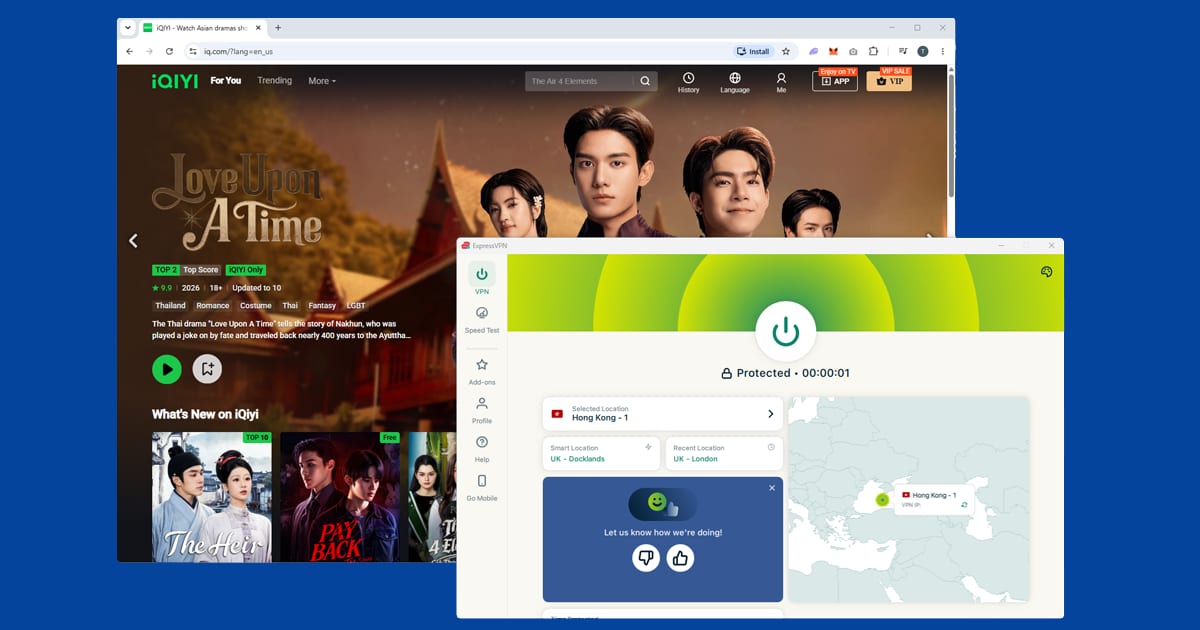
iQIYI China (iqiyi.com) has a much larger catalogue, but it's restricted to mainland Chinese IP addresses. Hong Kong won't do; you need a virtual China server, and most mainstream providers don't offer one. If this is the only reason you're buying a VPN, check the provider's published server list for China before you pay. Even with a Chinese IP, account sign-up is typically tied to a Chinese phone number, and premium tiers want a Chinese payment method, so a VPN alone may not get you everything.
Micro dramas. iQIYI International has had a big 2026. The company says viewing on its international platform rose 130% year on year in the first half of the year, driven by long-form Chinese dramas and a fast-growing range of micro dramas: very short episodes built for watching on your phone. Because each episode is so short, the app loads new videos constantly, and a slow or overloaded server shows up as a spinning wheel between episodes. If micro dramas stutter while full-length dramas play fine, try a closer server, such as Singapore or Hong Kong, rather than a distant one.
The new Viu bundle. Viu and iQIYI International have announced a combined subscription for Indonesia, Thailand, the Philippines and Malaysia, planned for the second half of 2026. The Viu section below explains how to handle it with a VPN.
Viu
Viu is built around Asian content: K-dramas, C-dramas, Thai dramas and regional variety shows. Its big draw for K-drama fans is that it licenses shows directly from Korean broadcasters and often releases new episodes the same day they air in Korea, which is faster than Netflix for a large chunk of the catalogue. It's available across Southeast Asia, the Middle East, Africa and Oceania, but not in the UK, US or most of Europe, where you'll see a "not available in your region" message.
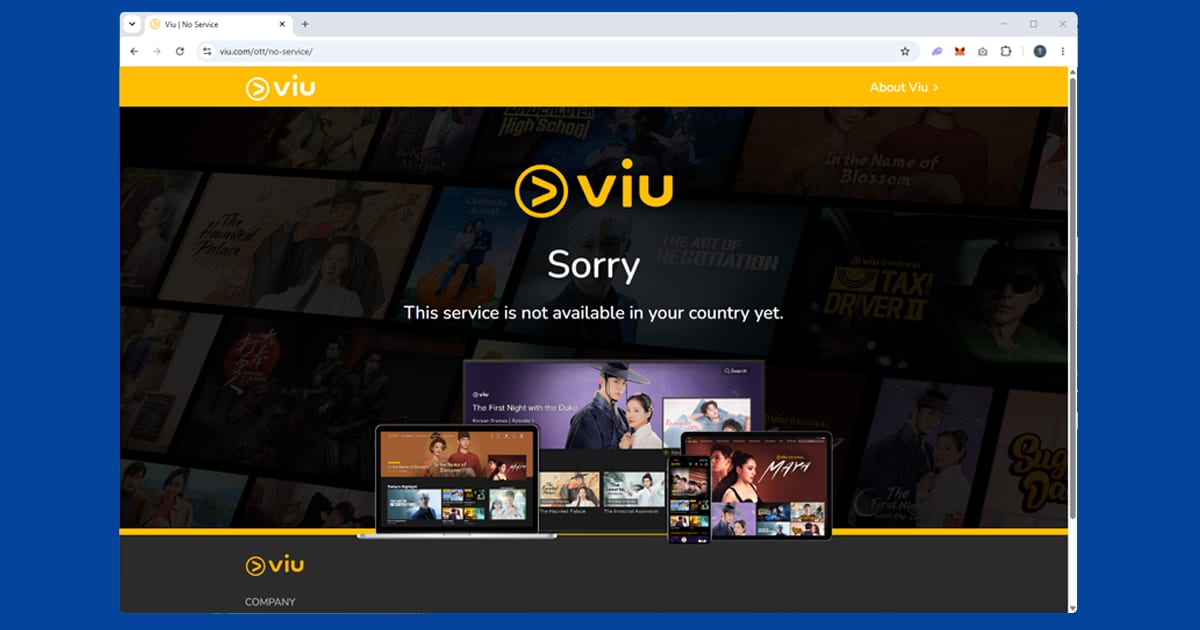
Which server. Singapore and Hong Kong are the best starting points. Singapore's Viu typically has the broadest K-drama library. If both fail, Malaysia, the Philippines and the UAE are also Viu markets. Viu does keep a list of known VPN addresses, but it's generally less aggressive than Netflix, so a quick switch to another server usually gets you back in. If every server you try gets flagged within a day or two, that points to your VPN having a small pool of addresses in that region rather than anything wrong with your setup.
Getting the app on an iPhone. Viu isn't listed in the UK or US App Store. You can switch your Apple ID region to Singapore under Settings your name Media & Purchases View Account Country/Region, agree to the terms, and choose None for payment if it's offered. Install Viu, then switch back; the app stays on your phone. If you'd rather not touch your Apple ID, viu.com in Safari works fine with the VPN on. On Android and Android TV, connect the VPN and open Viu; that's all. There's no dedicated Viu app on Apple TV that we've been able to confirm, so AirPlay from an iPhone or iPad with the VPN on is the simplest workaround.
Accounts and Premium. Both the free tier and Viu Premium just need an email address, from anywhere. The free tier has ads, and new episodes typically arrive a week late. Premium removes the ads and gives same-day episodes, which is the main reason to upgrade if you're following a drama as it airs. It's inexpensive by Western standards and takes international cards.
New in 2026. Viu Shorts is a vertical video section for bite-sized dramas you can finish in a few minutes; Viu's chief executive has said close to 20% of its long-form viewers already watch these microdramas. The bundle with iQIYI International (see above) is one payment but two separate apps, each with its own login and its own location check. Connect to the country your bundle was bought in before opening either. If one app plays and the other shows a location error, it's almost always a busy server, so switch to another one in the same country.
Viki
Rakuten Viki carries K-dramas, J-dramas, Chinese and Thai dramas, with subtitles written and polished by a worldwide community of fans. On popular titles they're often better than you'd expect. The catch is that Viki carves up its library show by show: some titles are licensed in the US but not Europe, others only in certain Asian markets, and a few everywhere. So the server you need depends on the show, not just the service.
Start with the US. Viki's US library is generally its widest, so it's the sensible default if you're not sure. In NordVPN, New York or Los Angeles are good starting points; in ExpressVPN, pick any US city and try another if the first gives a location error.
Then check the show's page. This is the step most people skip. A show's page on viki.com usually lists the regions where it can be watched. If you're seeing "not available in your region", check that list before blaming your VPN, connect to one of the listed countries, and search again in a fresh private window. If no regions are listed at all, the show probably isn't on Viki right now, and no server will change that.
Blocks are light. Viki blocks some known VPN addresses, though less aggressively than Netflix, and the blocks are at the IP level rather than against VPN companies by name. Switching to another city in the same country usually does it. Its terms do prohibit using a VPN to reach content that isn't licensed in your region; in practice, enforcement tends to be at the content level rather than against accounts, but it's good to know the policy.
Prices and billing. Viki updates Viki Pass prices from time to time and sets them country by country, so what you pay depends on where your account and payment method are based. Check your next renewal rather than assuming it's the same as last year. Signing up, upgrading or renewing while you appear to be in another country can muddle your billing, so the safe habit is to manage your subscription with the VPN off, or on a server in your home country, and only switch region when you sit down to watch.
Apps. Viki has iOS and Android apps; connect the full VPN app first, then open Viki. If the app isn't in your local store, viki.com works just as well in a mobile browser. On busy days, the closest server that still has your show will buffer least: if a drama is available in both the US and a European country, pick the nearer one.
Abema
Abema is a Japanese streaming and live TV service, and unlike iQIYI or Viu it doesn't run a general international edition. A limited international app trialled in 2019 only covered news, Shogi and Mahjong, never the anime, variety and sport most people want. Outside Japan, the app and abema.tv refuse to load, so a Japan server is the only way in.
Why it's locked. Abema is a joint venture between CyberAgent and TV Asahi (CyberAgent holds the larger stake) and has run since 2016. Most of what it carries is licensed for Japan only: some is content TV Asahi already broadcasts at home, and some is anime that studios have only cleared for streaming inside Japan, often ahead of a wider release on a service like Crunchyroll. If you're after anime that's already reached the West, our Crunchyroll and HIDIVE guides are the better place to look.
What's on it. Anime simulcasts and a deep back catalogue, plus around 25 linear channels covering variety, drama, news through Abema Prime, and dedicated Shogi and Mahjong channels. Sport is big too: RIZIN fight cards and boxing, Grand Sumo tournaments, a package of MLB games, a slice of Premier League football, and pay-per-view for the biggest combat sports events and concerts. Check whether a match is free or pay-per-view before blaming the VPN.
Which server. Tokyo is the most reliable city to start with; Osaka is a good alternative. Outside Japan, the block usually looks like a blank error screen or a message saying the content isn't available in your region, rather than anything mentioning a VPN.
Abema catches people out because it doesn't behave like the other Japanese and Asian platforms we cover. There's no separate international app to fall back on if a server stops working. If a Japan connection isn't getting you in, the fix is always another Japan server, never a different country entirely.

Paying for Premium. The free, ad-supported tier covers a large part of the catalogue and needs no payment details, just the Japan server. Abema Premium is easiest with a Japanese payment method. Billing to a docomo, au or SoftBank phone account only works inside Japan, so a Japan-issued card or Japanese app store account is the most reliable route. Some international cards are accepted, but it isn't guaranteed.
Big live events. Abema streamed all 64 matches of the 2022 World Cup free in Japan, and Japan's last-16 match against Croatia alone pulled in more than 20 million viewers. It offered free live World Cup streaming in Japan again in 2026, but this time DAZN carried all 104 matches in Japan, so if a game wasn't listed on Abema, that's the likely reason rather than your VPN. Live events put the most strain on Japan servers, so connect a few minutes early, keep a second Japanese server in mind, and leave the VPN on throughout. For replays, see our World Cup 2026 guide.
TVer
TVer is Japan's official catch-up TV service, and it's completely free and ad-supported, with no premium tier. That's exactly why location is its only gatekeeper. It's jointly owned by Japan's five biggest commercial broadcasters, Nippon TV, TV Asahi, TBS, TV Tokyo and Fuji TV, each with a roughly equal stake, plus a handful of regional Osaka stations with smaller shares. The shows are still licensed by the individual broadcasters for Japanese viewers only, so tver.jp and the app won't load abroad. The same Japan server you use for Abema works here, and the two run happily side by side.
Catch-up versus live. Most of the library is catch-up: episodes that already aired, available for a limited window afterwards, typically around a week, though it's set programme by programme. TVer also runs live simulcasts of prime-time programming (roughly 7pm to 11pm Japan time) from around ten of the major Tokyo and Osaka broadcasters, with a start-over feature that rewinds a live show to the beginning. Catch-up just needs a Japan IP when you press play. Live streams tend to be pickier about the specific server and connection quality, so if catch-up works but a live stream won't start or keeps dropping, switch to another Japan server rather than assuming your VPN has failed.
What's on it. Recent Japanese drama series, variety and talk shows, news from the major commercial networks, and a good amount of anime that airs on Japanese TV before it reaches international platforms. Sport appears too, though it varies by season and broadcaster rights.
Apps and devices. TVer has iPhone and Android apps, and in most cases you can download them from your home-country app store, because it's the content that's region-locked, not the listing. If yours doesn't show it, tver.jp in a mobile browser works just as well. New features tend to arrive in the apps before the website. If you opened the app before connecting the VPN, close it fully first, or it can hang on to your real location. Apps check location in their own way, so our guide to using a streaming app instead of a browser is worth a read if the website works but the app doesn't. On TVs, TVer only appears on some Japanese smart TV platforms. On a Fire TV Stick where TVer isn't in your Amazon store, use the website through a browser app, or cast tver.jp from a VPN-connected laptop to a Chromecast. A router VPN is the most dependable option for regular TV viewing.
Accounts. You don't need one to watch, but a free TVer ID adds recommendations, continue-watching across devices and the start-over feature. Sign-up needs an email address, a six-digit confirmation code, a username and password and a few profile details, with no Japanese phone number and no payment. Connect to Japan before you start, since the registration page runs the same location check.
TVer keeps growing at home, with more than 44 million monthly users in Japan by late 2025.
Which VPN to use
For five of these six services, any good paid VPN with plenty of servers in the right countries will do. NordVPN is our first pick, with Japan, Singapore, Hong Kong and US servers that work for Abema, TVer, Viu, Viki and iQIYI International, and it refreshes its IP ranges regularly, which matters because these services flag addresses over time. ExpressVPN is a close second for the same locations.
China is the exception. If you specifically need iqiyi.com or the main Youku site, you'll need a provider that lists a China location, and very few mainstream VPNs do. Check the provider's server list for China before you pay, use its money-back guarantee to test it, and expect speeds to be slower than on other locations. For most people, Youku's international app or iQIYI International is the easier route.
Free VPNs are a poor fit across the board. They rarely offer Japan or China servers at all, and the Singapore, Hong Kong and US servers they do have are overcrowded and get blocked quickly. Some also cover their costs by logging and selling your data; our guide to free VPN safety explains what to check. If you hop between countries a lot, turn on your VPN's kill switch too, so your device doesn't quietly fall back to your real IP if the connection drops mid-episode. Our kill switch guide shows how.
For Indian services like JioHotstar and ZEE5, see our Indian streaming guide, and for every other country we cover, head to the international streaming hub.