FixYourVPN

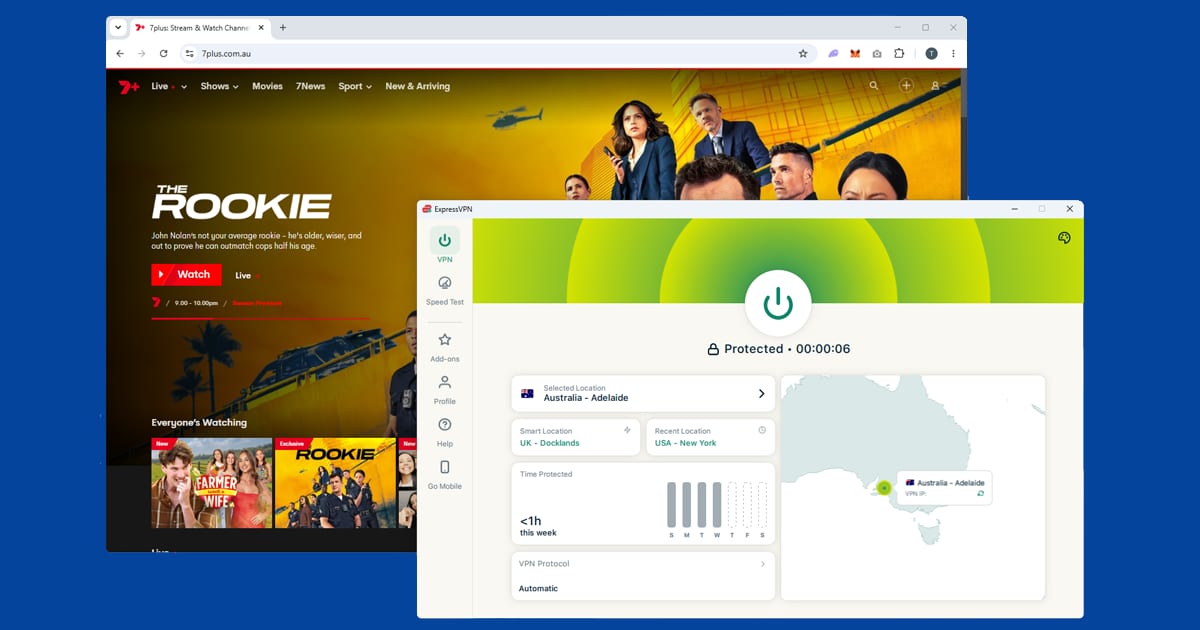
Australian TV apps such as 7plus, 9Now, 10, SBS On Demand, Stan and Binge only play for viewers with an Australian connection, so outside the country you'll get a location error, sometimes even with a VPN switched on. The fix is nearly always the same: connect to an Australian server before you open the app, start from a clean private window, and switch servers if the one you're on has been flagged. Binge and SBS On Demand also check your DNS, so turn on DNS leak protection before you start with those two.
This guide covers all six services in one place. The shared steps come first, because they work for every app, and then each service gets its own section with the quirks, error messages and sign-up details that only apply to it.
The six services at a glance
| Service | Cost | What sign-up asks for | How strict it is |
|---|---|---|---|
| 7plus | Free with ads | Email, plus an Australian postcode | Light: mainly checks your IP address |
| 9Now | Free with ads | Email only | Light: one server change usually fixes it |
| 10 (formerly 10Play) | Free with ads | Email and password, no postcode | Light |
| SBS On Demand | Free with ads | Name, email, birth year, gender and a postcode | Medium: checks DNS as well as IP |
| Stan | Paid subscription | Payment card; international cards generally work | Light to medium: blocks individual server IPs |
| Binge | Paid subscription | An Australian payment method for new accounts | Strictest: checks DNS as well as IP |
Why Australian TV apps block VPNs
Every one of these services buys or licenses its shows for the Australian market only. To stick to those deals, they check where you're connecting from, and if it isn't Australia, the stream won't start. That's called geo-blocking, and it applies to everyone outside the country, Australian citizens included. SBS's own help centre says as much: the restriction comes down to licensing and doesn't care where you're from.
The checks come in a few layers, and knowing them makes the fix much easier to follow.
- Your IP address. This is the number your connection shows to every website, and it gives away your rough location. Most of these apps check it the moment the page loads, and some check again when you press play. A VPN swaps it for an Australian one.
- Lists of known VPN servers. Services keep lists of IP addresses they've seen being used by VPNs and block them. That's why one server can fail while another in the same city works fine.
- Your DNS. DNS is the address book your device uses to find websites. If those lookups still go through your real internet provider, a service can spot your true location even though your IP looks Australian. This is called a DNS leak, and it's the step that catches people out on Binge and SBS.
- Cookies and cached data. If you ever opened the site or app without the VPN running, it may have saved your real location and will read that before it looks at your new IP.
Sign-up adds two more hurdles. Some services ask for an Australian postcode when you register (7plus and SBS do; 9Now and 10 don't), and any Australian postcode works, such as 2000 for Sydney or 3000 for Melbourne. The paid services also have payment rules: Stan generally accepts international cards, while Binge usually wants an Australian-issued card or another payment method Foxtel accepts for Australian accounts. If you already subscribed while living in Australia, none of that matters; your existing plan carries on and you just need the VPN.
How to fix it, step by step
These steps work for all six services. Go through them in order, because the order matters more than you'd think.
- Turn on DNS leak protection first. In NordVPN, open Settings > Connection and switch it on. In ExpressVPN, it's handled automatically when you connect, though it's worth a quick look in settings. In PureVPN, open Settings > Internet Security. Our DNS leak guide covers each app in more detail.
- Connect to an Australian server before you open anything. Sydney is the best place to start, as it usually has the biggest choice of servers. Melbourne is the best backup, and Brisbane works well too. If an app is already open, close it completely, connect the VPN, then reopen it.
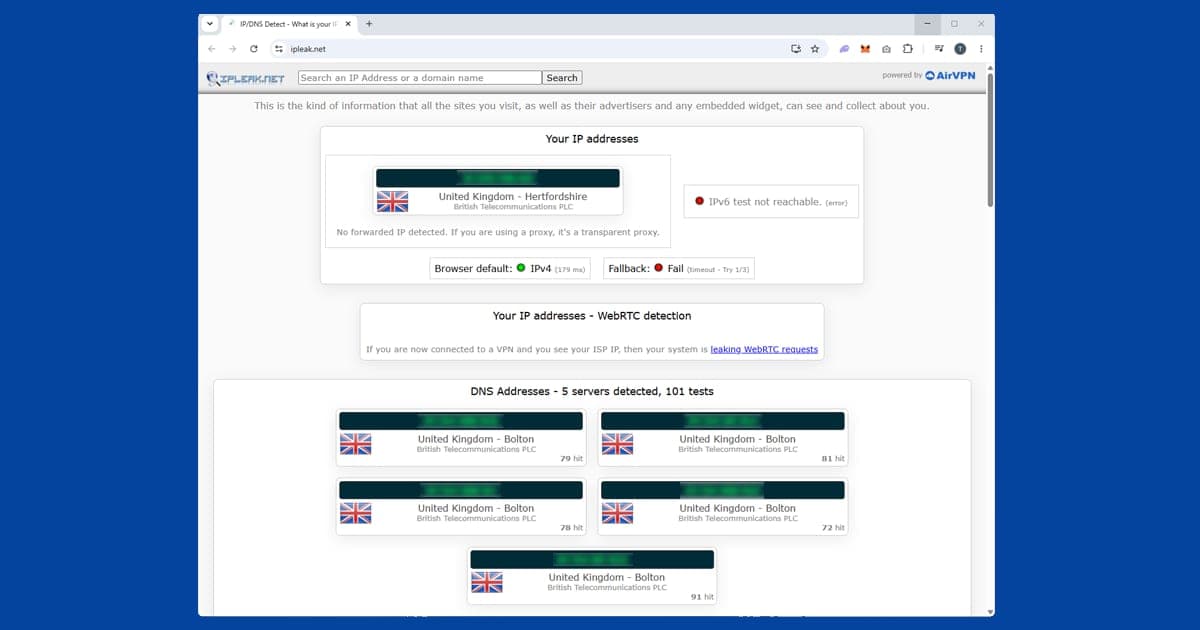
- Check what the service will see. Open our IP address checker with the VPN on. If it shows your real country or your real internet provider, the VPN isn't routing properly on that server; reconnect or pick another server before going further.
- Open the site in a private or incognito window. A private window starts with no stored cookies, so the only location the site sees is the Australian one your VPN is giving it. On the apps, sign out, close the app fully and reopen it with the VPN already connected.
- Sign in, or create your account while connected. Sign-up pages can turn away non-Australian addresses, so make the account with the VPN on. If a postcode is needed, use 2000 or 3000.
- If you're still blocked, switch server. Try a different server in the same city first, then a different city. Our guide to switching VPN servers shows where the option is in each app.
- Change your VPN protocol. The protocol is the method your VPN uses to connect. Switch to NordLynx in NordVPN (its version of WireGuard) or Lightway in ExpressVPN, reconnect and try again. Our protocol guide walks through it.
- Clear old cookies and app data. If a private window isn't an option, clear the site's cookies in your normal browser. Our guide to clearing cache and cookies covers every main browser.
Phones, tablets and TVs
On a phone or tablet, use the full VPN app rather than a browser extension. An extension only covers your browser, so the TV app itself won't be protected. If an app doesn't show up in your App Store or Google Play, that's because your store shows the catalogue for the country you're in. The easiest way round it is to use the service's website in your mobile browser. You can also switch your store account to Australia, though that affects every app and purchase on the account, and Google only allows a Play Store country change once a year; our Google Play Store guide explains how that works.
Apple TV and Fire TV Stick can run NordVPN and ExpressVPN apps directly, which makes them the simplest TV setup. Most Samsung, LG and other smart TVs can't run a VPN app at all, so the practical options are setting the VPN up on your router, so everything at home gets the Australian connection, or casting from a phone or laptop that already has the VPN running.
Buffering and free VPNs
If the stream plays but keeps buffering, that's a speed problem rather than a block. Use NordLynx or Lightway, stick with a well-served city like Sydney or Melbourne, and plug into a wired connection for live channels and live sport, where wi-fi jitter shows up most. Free VPNs aren't worth the bother here: they share a small pool of server addresses between huge numbers of people, so those addresses get flagged quickly, most don't offer proper DNS leak protection, and data caps and slow speeds make live TV painful. Our guide to free VPN safety covers the other risks.
7plus
7plus is Seven Network's free streaming service. It carries five live channels, Channel 7, 7mate, 7two, 7flix and 7Bravo, all running on Australian Eastern time, plus a big catch-up library of everything Seven has aired.
Home and Away is the headline draw for most people watching from abroad. It's been on Seven since 1988. It does air in the UK on Channel 5, but that version runs well behind the Australian broadcast, so if you want the current episodes rather than waiting for the UK schedule to catch up, 7plus is the only option. Seven also makes My Kitchen Rules, SAS Australia and Farmer Wants a Wife, and Sunrise, the morning news programme, goes out live every weekday.
Sport is the other big reason to use it. Seven holds the free-to-air AFL rights in Australia, so the matches it broadcasts stream live on 7plus. Not every AFL game is free-to-air, though; some are exclusive to Foxtel and Kayo, and our Kayo guide covers that side. Seven also has Melbourne Cup week and the Spring Racing Carnival, and its 2026 sport schedule includes the Rugby League World Cup alongside AFL, AFLW, Test cricket and the Big Bash.
Signing up and the location error
The account is free and only needs an email address. Sign up at 7plus.com.au with the VPN already connected, because registering from a non-Australian IP may block the sign-up page. You'll probably be asked for a postcode; any Australian one is fine.
The error is usually a blunt message saying the content isn't available in your region. On live streams you'll sometimes get a generic playback error instead, which looks like a technical glitch rather than a geo-block. Treat both the same way: reconnect, open a fresh private window and reload. If our IP checker shows Australia but 7plus still won't play, the server has probably been flagged, so try Melbourne or Brisbane.
What's new in 2026
In January 2026, Seven West Media, which owns Seven and 7plus, merged with Southern Cross Media, the radio group behind Triple M and Hit. Nothing changed for viewers day to day. More useful is the new "Remind Me" alerts that sync to your phone. Time zones make it easy to miss a bounce-down, and a nudge a few minutes early gives you time to connect your VPN and try another server if the first is busy.
7plus has apps for iOS, Android, Apple TV, Samsung and LG smart TVs. We haven't been able to confirm official apps on PlayStation or Xbox, so cast from a phone or laptop if you want it on a console.
9Now
9Now is the Nine Network's free streaming service, and it's one of the easiest Australian services to get working from abroad. It doesn't use the aggressive detection Kayo or Binge do, so you rarely need to touch DNS settings. Connect to an Australian server, clear old cookies, and you should be watching within a few minutes.
Sign-up is the simplest of the lot: a free account with just an email address. No Australian address, no postcode and no payment details. You do need to be signed in to watch most of the content, though, as 9Now restricts what's available without an account.
What's on 9Now
For Australians abroad, 9Now is where Australian reality TV lives. The Block, Married at First Sight, Australian Ninja Warrior and Lego Masters Australia are Nine productions that stream on 9Now in Australia and aren't on any major international platform. It also has live news, some NRL coverage and a good choice of US dramas Nine has picked up.
All five channels stream live: Channel 9 carries the main network programming, 9Gem leans towards classic series, 9Go is more entertainment, 9Life is lifestyle and 9Rush covers motorsport and sport highlights. They run on Australian Eastern time, so check the time difference before you sit down for anything live.
The Australian Open and Stan Sport
9Now is at its busiest in January, when Nine shows the Australian Open. For the 2026 tournament, Nine streamed it live and free on 9Now, along with replays and highlights, and that's exactly when expats tend to discover their VPN isn't quite set up right. Nine's paid service, Stan Sport, carried every match too, but in 4K and with extra programmes such as a daily round-up show. If you just want to follow the matches, 9Now is enough; if picture quality on a big TV matters, Stan Sport is the upgrade.
For big live events, connect before the match starts. Swapping servers mid-match means reloading the player and sometimes signing in again, so if a server feels slow, change it between matches rather than in the middle of a tie-break.
If the location error won't shift
If 9Now loads but says it isn't available in your region, try a different Australian server first, because one server IP may have been flagged. If that doesn't help, turn on DNS leak protection and reload in a fresh private window. One server change is usually enough on 9Now.
9Now has apps for iOS, Android, Apple TV, Samsung and LG TVs, and 9now.com.au works fine in a mobile browser if the app won't show in your store. As with 7plus, we haven't been able to confirm official console apps, so casting is the dependable route there.
10
If you're looking for 10Play and can't find it, you're not imagining things. Network 10 renamed its streaming service to simply "10" on 30 June 2025, and the website moved from 10play.com.au to 10.com.au. In 2026 the app, the website and the main TV channel all share the same name.
The channels were renamed too. 10 Bold became 10 Drama, 10 Peach became 10 Comedy and 10 News First became 10 News. So if you're hunting for the old 10 Peach live stream, it's now under 10 Comedy. The free account, the shows and the Australia-only check work the same way as before.
What's on 10
The library has two main pillars. The first is CBS content, because 10 holds CBS rights in Australia: NCIS and its spin-offs, the FBI franchise, Survivor, The Amazing Race and The Late Show with Stephen Colbert. The second is Network 10's own programming: The Project and Studio 10 for news and current affairs, Australian Survivor and The Bachelors for reality TV, and archived Neighbours episodes going back years. Live simulcasts of the 10 channels are included too, all free with ads.
Signing up and error messages
You need a free account to watch anything, but sign-up only asks for an email address and a password. Unlike 7plus and SBS, there's no postcode or address field. Just make sure your VPN is connected while you register.
10 doesn't always give you a clear "you're outside Australia" message. Sometimes it's a location notice; other times the page throws a 500 error code and refuses to load anything at all, which is confusing because it doesn't point at your location. Either way the cause is usually the same: 10 couldn't confirm an Australian IP when the page loaded. Reconnecting and reloading from a fresh private window clears both versions in most cases.
One thing to rule out separately: if the site loads but a single show won't play while everything else works, that's usually a rights issue. Some CBS content is licensed title by title and occasionally gets pulled or delayed, which has nothing to do with your VPN.
Tips specific to 10
- Update or reinstall an old 10Play app. An out-of-date app can fail in ways that look exactly like a VPN block.
- Swap old bookmarks. Replace 10play.com.au with 10.com.au, then clear your cookies so the site starts fresh.
- Try Perth if you're in Asia or the Middle East. Where your VPN offers it, a Perth server can give a shorter route and a steadier stream than Sydney.
10 has iOS and Android apps and is available on Apple TV, Chromecast and Android TV.
SBS On Demand
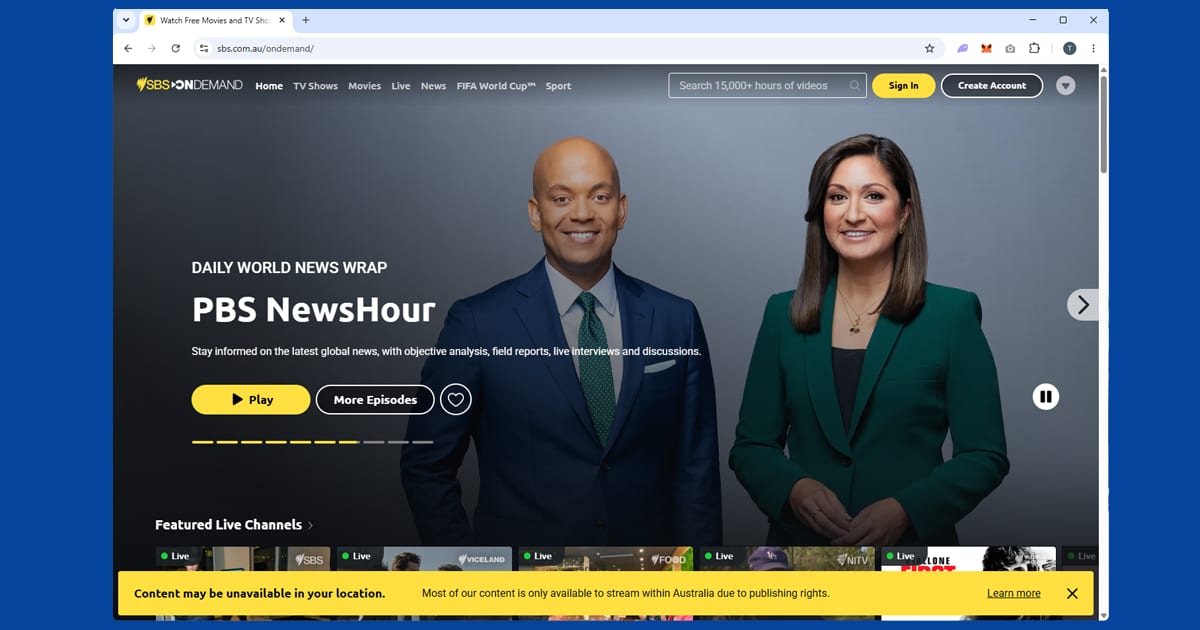
SBS On Demand is run by Australia's Special Broadcasting Service, a publicly funded broadcaster that feels quite different from the commercial streamers. It focuses on foreign language films, international drama and world news, with content in 16 languages and over 15,000 hours to watch. A good chunk of the library is organised by language, with sections covering Arabic, Chinese, Hindi, Vietnamese, Persian, Danish and around a dozen others. If you watch anything other than English-language TV, SBS is probably the most useful of the free Australian services.
It streams six channels live: SBS, SBS World Movies, SBS Viceland, NITV (National Indigenous Television), SBS Food and SBS WorldWatch, which pulls in news broadcasts from overseas networks. It's streaming only, with no download option, so everything needs an active connection.
Signing up
The free account asks for your name, email address, birth year, gender and a postcode, but no payment details. For the postcode, enter 2000 or 3000. SBS then sends a verification email with an activation link. Click it before you try to stream, and check your spam folder if it doesn't arrive.
One thing that catches people out with SBS: you need the VPN connected before you create your account, not just before you watch. The sign-up page can turn away non-Australian IPs, so you end up blocked before you've even started. Get the VPN on first, make the account, and after that you only need it running when you're actually streaming.

Why SBS is a bit stricter
SBS checks DNS as well as your IP address, so if our IP checker shows Australia but SBS still says "this content is only available in Australia", DNS is the likely reason. Try another server in the same city, confirm DNS leak protection is on, then switch protocol and reconnect. With DNS protection on, a decent VPN generally gets through without any drama.
The 2026 World Cup and app updates
SBS showed all 104 matches of the FIFA World Cup 2026 live and free, streaming every game on SBS On Demand. It has since built a World Cup collection with full match replays, mini matches and highlights, so look there to rewatch the Socceroos or the final. Our World Cup 2026 guide has more.
Before the first match, SBS told viewers to update the app so live streams would play properly. That's good advice any time: an out-of-date app can throw errors that look like a VPN block, so update first, then troubleshoot your server.
SBS has the widest device list of the six: Apple TV, Fire TV Stick, Android TV, Samsung, LG, Hisense, Sony and Panasonic smart TVs, plus PlayStation 4 and PlayStation 5.
Stan
Stan is one of Australia's main paid streaming services, built on a strong slate of originals. The Tourist, starring Jamie Dornan, was one of its biggest hits and has two seasons, and Wolf Like Me, Bump and Savage River are Australian originals that sit alongside international co-productions. Stan also carries CBS programming and a library of Showtime titles such as Billions, Yellowjackets and Dexter: New Blood. Paramount+ is a separate service in Australia, not a Stan add-on.
Stan does a straightforward IP check when the app or site loads, rather than the heavier detection some global services use, so it's one of the easier paid services to get working. It blocks individual server IPs rather than whole VPN providers. If the first Sydney server gives a location error, try a second Sydney server before moving to Melbourne; another server in the same city usually does it.
Signing up from abroad
If you already have an account, connect to Australia and sign in; your subscription stays active wherever you are. To create a new one, connect first and sign up at stan.com.au as normal. International credit cards generally work for the payment step. If you hit a payment problem, a prepaid Australian Visa or Mastercard is another option. Stan has offered a free trial for new subscribers, so check what's on offer when you sign up.
The July 2026 plan changes
Stan changed its plans in July 2026, so check which one you're on before you go away. The old ad-free Basic plan was replaced by Basic with Ads at $9.99 a month, and Basic subscribers were moved across automatically. You now get ad breaks, but HD instead of SD on one screen. Standard went up to $17.99 a month and Premium to $23.99. If you used to be on Basic and suddenly see ads abroad, that's the new plan, not your VPN. If you're away for months and only watch the odd show, the cheaper ad plan may be the sensible place to sit until you're home, and your Australian card keeps working as normal.
If you're travelling rather than emigrating, keeping the subscription running is usually simpler than cancelling, which loses your watchlist and continue-watching history.
Stan Sport
Stan Sport is a separate add-on you can put on top of any plan. It carries Super Rugby Pacific, rugby union internationals, tennis including Australian Open coverage, and some football, including the UEFA Champions League. It doesn't carry AFL. It works from abroad the same way as Stan itself. Stan is on iOS, Android, Apple TV, Chromecast, Android TV and Google TV, and Samsung, LG and Sony Bravia TVs.
Binge
Binge is Foxtel's entertainment streaming service, and it's the strictest of the six about overseas access. A good VPN on an Australian server is usually enough, but DNS leak protection matters more here than anywhere else, because Binge checks your DNS requests alongside your IP address. If Binge is blocking you even though your VPN is on, a DNS leak is almost certainly the reason. Turn protection on, check our IP checker doesn't show your real internet provider, then reconnect to a different server and open Binge in a fresh private window.
Binge also keeps a list of flagged VPN server IPs and updates it regularly. Paid services carrying premium licensed shows come with tighter contract rules about location than free catch-up TV, which is generally why Binge and Kayo put more effort into detection than 9Now or 7plus.
Where the HBO shows went
If you last used Binge a while ago, the biggest change is that HBO's shows left Binge in 2025, when Warner Bros. Discovery launched its own streaming service in Australia on 31 March and took its HBO and Max Originals with it. Seasons that had already started on Binge were allowed to finish there, but new HBO series now go to HBO Max. So if you're connecting from abroad for a particular HBO drama, check it's still on Binge before you start troubleshooting your VPN. Our HBO Max guide covers that service.
Binge has been filling the gap in other ways, alongside Sky Showcase content, Paramount productions and Binge Exclusives. In September 2026 it announced its 2027 line-up and a bigger partnership with NBCUniversal.
Billing, errors and app updates
Existing Australian subscribers keep their plan, price and payment method while travelling; the VPN only affects which streams Binge lets you watch. Setting up a brand new account from abroad usually needs an Australian card, which can be a real hurdle if you've never lived there. Asking someone in Australia to set it up is the usual workaround.
The error wording varies. If a single title won't play while the rest of Binge works, that's more likely a licensing hiccup than your VPN. If the whole app refuses to load, that points to the location check. And if Binge suddenly shows a location error after an app update, sign out, close the app fully, connect to Australia and sign back in, so the app picks up your VPN location rather than anything left over. Binge has apps for iOS, Android, Apple TV and some smart TVs.
Which VPN to use
You want a VPN with plenty of servers in Sydney and Melbourne, built-in DNS leak protection and fast modern protocols, because those three things cover every check these services run. NordVPN is our first pick: it has a wide choice of Australian servers, DNS protection in its connection settings and NordLynx for smooth live streams. ExpressVPN is a close second, with strong Australian coverage, DNS protection that switches on automatically and the Lightway protocol, which makes it a particularly good match for Binge and SBS. PureVPN is a solid budget choice; just make sure its DNS setting under Internet Security is on.
With any of them, the same subscription covers every service here, plus Kayo for sport. For more sport, see our live sport hub, and for services from other countries, our international streaming hub. Heading across the Tasman as well? Our New Zealand TV guide covers TVNZ+ and Neon, which need a New Zealand server rather than an Australian one.