FixYourVPN
Good news first: VPNs are completely legal in India and work normally on their standard settings. If yours isn't connecting or running slowly, it's almost always a speed or server issue rather than anything to do with government blocking. India doesn't systematically block VPN traffic. The most common culprits are connecting to a server that's too far away, or mobile carrier interference. Both are easy to fix.
VPNs aren't blocked in India
India doesn't use deep packet inspection to block VPN connections across the board. Social media, news, and general web browsing are all unrestricted. What Indian ISPs do block, by court order, are specific categories: torrent (file-sharing) and piracy sites, some adult content, and occasionally individual websites under copyright or legal orders. A small number of VPN provider websites have been blocked too, which is worth knowing before you travel.
So if your VPN isn't working in India, active censorship of VPN traffic almost certainly isn't the cause. It's a speed, server, or carrier issue. The fixes below go through each one.
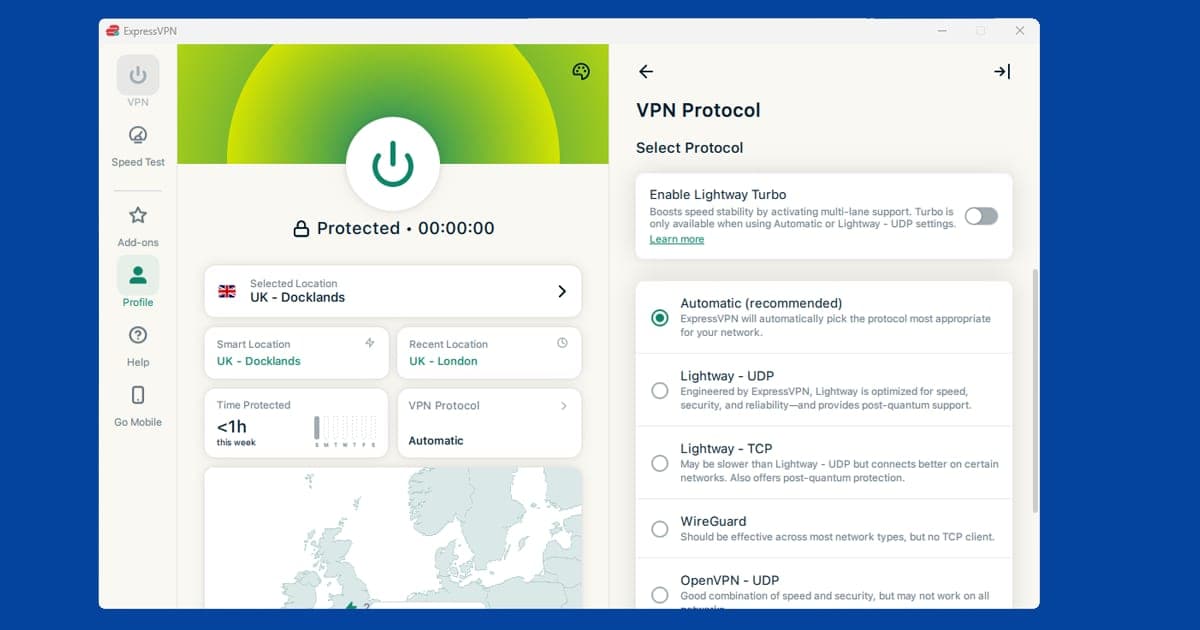
Switch to WireGuard for better speed
Slow speeds are the most common VPN complaint in India, and the protocol you're using is usually the reason. WireGuard is noticeably faster and more efficient than older options like OpenVPN or IKEv2, which makes a real difference when you're connecting over long distances.
- ExpressVPN: Settings > Protocol > Lightway. This is ExpressVPN's own fast protocol and the best choice for India.
- NordVPN: Settings > VPN protocol > NordLynx. NordLynx is built on WireGuard.
- Other providers: look for Protocol or Connection in settings and pick WireGuard if it's available.
If WireGuard isn't listed in your app, OpenVPN UDP is a reasonable fallback. Our guide on changing your VPN protocol has step-by-step instructions for all the major apps.
Connect to a server closer to India
Most VPN servers are clustered in Europe and the US. If you're in India and connected to a London or New York server, your traffic is travelling thousands of miles each way, which adds delay and reduces speed. Try these locations instead:
- Singapore: the closest major VPN hub to India and usually the fastest option
- Hong Kong: another good nearby choice with strong server availability
- Japan: reliable for speed and useful if you need an East Asian IP
- UK: the right choice if you need a British IP address specifically, but expect slower speeds than Singapore
When speed matters, Singapore is almost always the answer. Our guide on switching VPN servers shows you how to find city-level options in your app.
Enable DNS leak protection
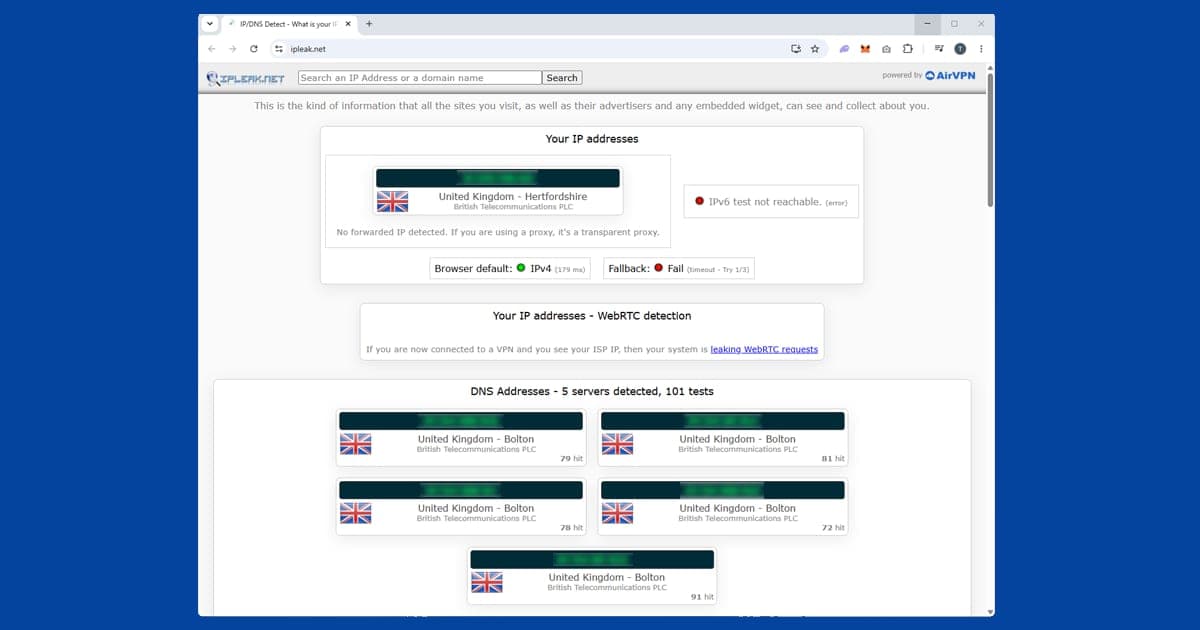
Some Indian ISPs intercept DNS requests before they reach your VPN. DNS is the background process your device uses to look up websites. When a carrier intercepts those lookups, it can see which sites you're visiting even when your VPN appears to be on.
Enabling DNS leak protection routes those lookups through the encrypted VPN tunnel, so your ISP can't intercept them.
- ExpressVPN: go to Settings and confirm DNS leak protection is toggled on.
- NordVPN: go to Settings > Advanced and check DNS leak protection is on.
- Other providers: look under Privacy or Advanced in your VPN settings.
To check it's working, use our IP checker with your VPN connected. If your Indian ISP still shows up, the leak is still happening. Our DNS leak guide goes into more detail.
If your VPN keeps dropping on mobile data
India's main mobile carriers (Jio, Airtel, and Vodafone Idea) sometimes throttle or drop VPN connections on mobile data. If your VPN works fine on wi-fi but cuts out on mobile data, carrier throttling is the likely reason.
Two things to try. First, switch to WireGuard if you haven't already: it's harder for carriers to throttle because it uses less overhead. If that doesn't help, try TCP mode on port 443. Port 443 is the standard HTTPS port used by every secure website, so carriers almost never block it. Your VPN traffic looks like normal web browsing and carriers are much less likely to interfere.
In NordVPN, set the protocol to OpenVPN (TCP). In ExpressVPN, switch to Lightway TCP.
The same TCP-on-443 approach is worth trying if you're connecting from a cafe, hotel, or airport network in India rather than your home wi-fi, since restricted public networks add another layer of filtering on top of anything the carrier itself is doing. Our guide to fixing VPNs on public wi-fi covers the sign-in page and protocol steps that apply on any restrictive network, not just in India specifically.
Once you think you've got a stable connection, it's worth actually confirming it rather than assuming. Our guide to checking your VPN is working walks through quick tests for your IP address, DNS requests, and kill switch, which takes the guesswork out of whether a slow or flaky connection is really fixed.
Watching Indian streaming services from outside India
If you're a UK viewer trying to watch JioHotstar or other Indian services, you need a VPN connected to an Indian IP address. Both NordVPN and ExpressVPN's virtual Indian servers give you a working Indian IP. Connect to the India server, check our IP checker confirms it's showing India, then open JioHotstar normally.
Our full guide on VPN not working with JioHotstar covers the streaming-specific fixes if you run into trouble there.
If your VPN app is missing from an Indian app store
There have been periods where certain VPN apps have been harder to find, or briefly unavailable, in Indian app stores, generally linked to regulatory pressure on specific providers rather than a blanket rule against VPN apps as a category. We can't confirm the current status for every individual app, since this kind of thing shifts and isn't always well documented, so if you can't find your provider's app when searching from an Indian Play Store or App Store account, the first thing to check is whether it's simply a regional listing quirk rather than a removal.
Switching your Play Store country isn't a quick fix here, since Google limits that change to once every twelve months.
The reliable workaround is downloading the app directly from your VPN provider's own website rather than an app store, which is how most reputable providers distribute their Android apps anyway (as an APK file) alongside the Play Store listing. Only ever do this from the provider's official site, never a third-party download page, since a fake VPN installer is a genuinely dangerous way to get malware onto your device.
Are free VPNs worth using in India?
We'd steer clear for anything beyond very occasional, low-stakes use. Free VPNs tend to route a large number of users through a small pool of servers, and with India's mobile networks already adding some distance to nearby VPN hubs like Singapore, that combination makes for slow, unreliable connections in practice.
Free VPNs are also less likely to include solid DNS leak protection or a working kill switch, both of which matter more, not less, on Indian mobile networks where connections already drop periodically. If cost is the main concern, a budget-friendly paid VPN with a proper no-logs policy is generally a safer bet than a free one for anything you actually care about protecting.
Billing and payment when subscribing from India
Most major VPN providers accept Indian debit and credit cards, UPI, and international payment methods like PayPal, though the exact options vary by provider and can change, so it's worth checking the payment page before assuming a specific method is supported. If a card payment is declined, it's sometimes your bank's fraud check flagging an international transaction rather than anything wrong with the VPN provider; some Indian banks require you to explicitly enable international or online transactions on your card before a foreign subscription will go through.
Pricing is generally shown in USD unless the provider specifically supports INR billing, so factor in currency conversion and any foreign transaction fees your bank charges before comparing prices against local alternatives.
India's proposed VPN law: what it means for you
VPN rules in India could tighten again. Back in 2022, CERT-In, India's cyber security agency, told VPN providers with servers in India to keep user records for five years. Several big providers refused, and companies such as NordVPN and ExpressVPN took their physical servers out of the country, offering "virtual" Indian locations hosted elsewhere instead. In July 2026, officials confirmed the government is working on a new legal framework for VPN providers, reported to include local offices, compliance officers and the same five-year data retention.
Nothing has been finalised yet, and the proposals are aimed at companies rather than at you. Using a VPN in India is still legal. If the rules do change, though, providers might adjust their apps, server lists or payment options for Indian customers, so keep your VPN app updated and read any notices your provider sends.
In the meantime, the practical advice hasn't changed. Pick a provider with a clear no-logs policy, use a nearby server such as Singapore if speeds dip, and keep your kill switch on. If you're outside India and want to watch Indian services, our ZEE5 guide covers one of the biggest. For general connection fixes, see the connection problems hub.